A = matrix(c(2,1,1,4), ncol=2, byrow=TRUE)
A
[,1] [,2]
[1,] 2 1
[2,] 1 4The univariate normal distribution is fundamental in statistics. But real data usually involve multiple variables measured on the same subjects, and these are often correlated.
Recall that if a random variable X has a normal distribution with mean \mu and variance \sigma^2, its density function has the form f(x) = \frac{1}{ \sqrt{2 \pi } \sigma} \exp \left\{-\frac{1}{2\sigma^2} (x - \mu)^2 \right\}, \;\;\;\; -\infty < x < \infty.
A = matrix(c(2,1,1,4), ncol=2, byrow=TRUE)
A [,1] [,2]
[1,] 2 1
[2,] 1 4a = 2
a * A [,1] [,2]
[1,] 4 2
[2,] 2 8B = matrix(c(1,2,2,9), ncol=2, byrow=TRUE)
A + B [,1] [,2]
[1,] 3 3
[2,] 3 13x = c(1,2)
A %*% x [,1]
[1,] 4
[2,] 9A %*% B [,1] [,2]
[1,] 4 13
[2,] 9 38# matrix inversion
solve(A) [,1] [,2]
[1,] 0.5714286 -0.1428571
[2,] -0.1428571 0.2857143# check result
A %*% solve(A) [,1] [,2]
[1,] 1 0
[2,] 0 1Given a p \times p square matrix A, an eigenvector \mathbf{v} and its corresponding eigenvalue \lambda satisfy: A \mathbf{v} = \lambda \mathbf{v}
Interpretation: Multiplying A by its eigenvector \mathbf{v} simply stretches or shrinks \mathbf{v} by a factor \lambda—the direction of \mathbf{v} does not change.
Why Do They Matter?
Some Properties
For any p\times p symmetric matrix A, its spectral decomposition is A = \lambda_1 \mathbf{e}_1 \mathbf{e}_1^{\top} + \lambda_2 \mathbf{e}_2 \mathbf{e}_2^{\top} + \cdots + \lambda_p \mathbf{e}_p \mathbf{e}_p^{\top}
A = matrix(c(4, 2, 1, 3), nrow = 2)eig = eigen(A)
print(eig)eigen() decomposition
$values
[1] 5 2
$vectors
[,1] [,2]
[1,] 0.7071068 -0.4472136
[2,] 0.7071068 0.8944272det for Small Matricesdet(A) [1] 10E = eigen(A)
prod(E$values)[1] 10The multivariate normal distribution (MVN) generalizes the univariate normal distribution to multiple variables.
A random vector \mathbf{x} = (x_1, x_2, \ldots, x_p)^\top follows a multivariate normal distribution if every linear combination of its components is normal. We use the notation: \mathbf{x} \sim N_p(\boldsymbol{\mu}, {\Sigma}) \quad \text{ or }\quad \mathbf{x} \sim \text{MVN}(\boldsymbol\mu, \Sigma) where
The probability density function for \mathbf{x} \sim N_p(\boldsymbol \mu, \Sigma) is f(\mathbf{x}) = (2\pi)^{-p/2} |\Sigma|^{-1/2} \exp\left(-\frac{1}{2}(\mathbf{x}-\boldsymbol\mu)^\top \Sigma^{-1}(\mathbf{x}-\boldsymbol\mu)\right)
Geometric Interpretation:
The quadratic form (\mathbf{x}-\boldsymbol\mu)^\top \Sigma^{-1}(\mathbf{x}-\boldsymbol\mu) in the density formula is the squared statistical distance of \mathbf{x} from \boldsymbol\mu. It is often referred to as the square of the Mahalanobis distance.
If \mathbf{x} \sim N_p(\boldsymbol\mu, \Sigma), then the following statements are true:
mu = c(0,0)
Sigma = matrix(c(2,1,1,4),ncol=2, byrow=TRUE)
a = c(1,1)

# simulate from MVN
set.seed(4750)
x = MASS::mvrnorm(1, mu=mu, Sigma=Sigma)# linear combination
t(a) %*% x [,1]
[1,] -0.4976936# quadratic form
t(x-mu)%*%solve(Sigma)%*%(x-mu) [,1]
[1,] 0.07250492library(MASS)
set.seed(4750)
mu <- c(0, 0)
Sigma_none <- matrix(c(1, 0, 0, 1), nrow=2)
Sigma_pos <- matrix(c(1, 0.8, 0.8, 1), nrow=2)
Sigma_neg <- matrix(c(1, -0.8, -0.8, 1), nrow=2)
X_none <- mvrnorm(500, mu, Sigma_none)
X_pos <- mvrnorm(500, mu, Sigma_pos)
X_neg <- mvrnorm(500, mu, Sigma_neg)
par(mfrow = c(1,3))
plot(X_none, main="No Correlation", xlab="X1", ylab="X2", col=rgb(0,0,1,0.3), pch=16)
plot(X_pos, main="Positive Correlation", xlab="X1", ylab="X2", col=rgb(0,0.5,0,0.3), pch=16)
plot(X_neg, main="Negative Correlation", xlab="X1", ylab="X2", col=rgb(1,0,0,0.3), pch=16) 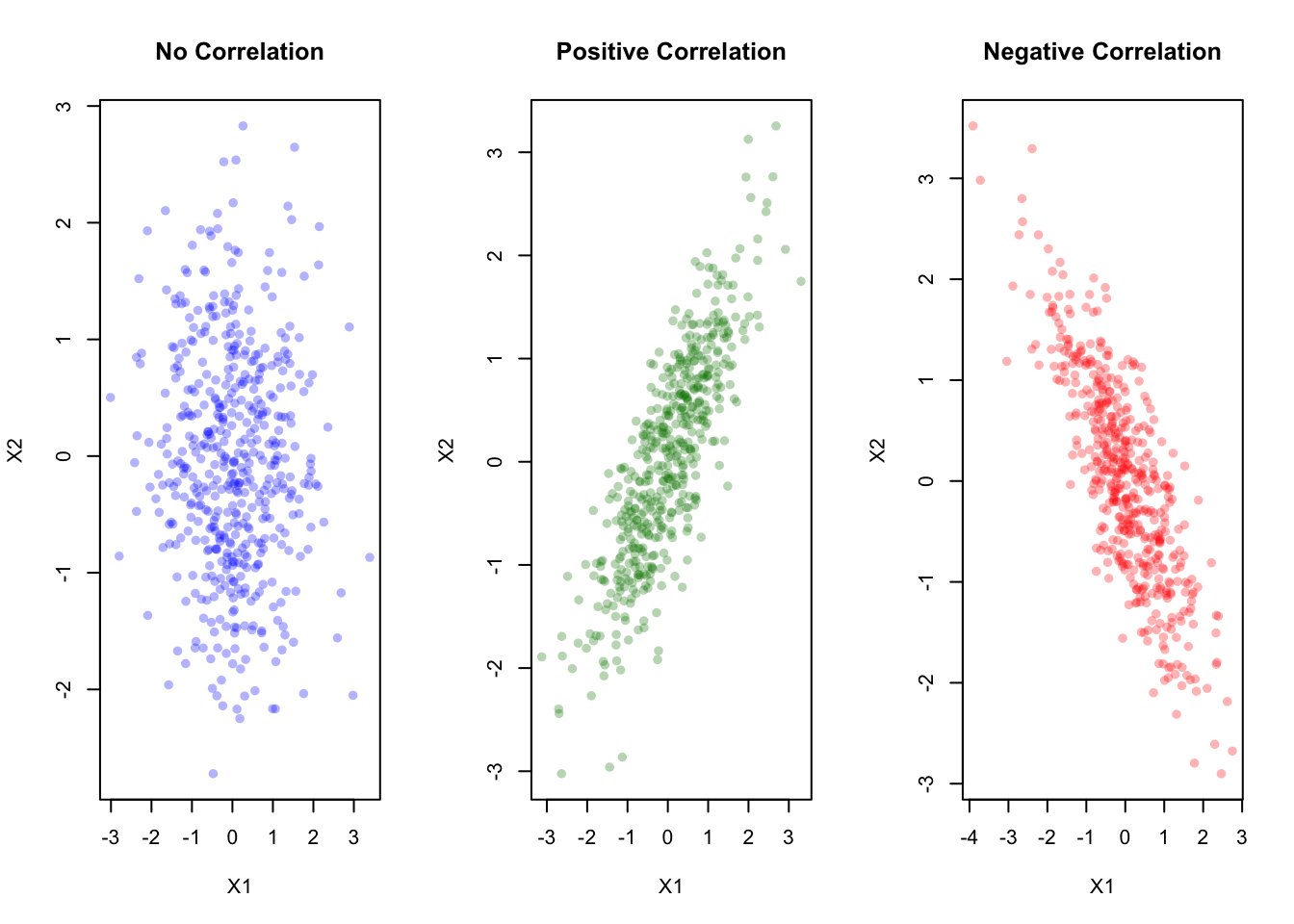
Try changing the covariance matrix \Sigma in the code above.
Let’s visualize how changing the off-diagonal entries (correlation) in \Sigma affects the bivariate normal:
library(MASS)
set.seed(4750)
mu <- c(0, 0)

# Case 1: No correlation (off-diagonal = 0)
Sigma_none <- matrix(c(1, 0, 0, 1), nrow=2)
X_none <- mvrnorm(500, mu, Sigma_none)

# Case 2: Strong positive correlation (off-diagonal = +0.9)
Sigma_pos <- matrix(c(1, 0.9, 0.9, 1), nrow=2)
X_pos <- mvrnorm(500, mu, Sigma_pos)

# Case 3: Strong negative correlation (off-diagonal = -0.9)
Sigma_neg <- matrix(c(1, -0.9, -0.9, 1), nrow=2)
X_neg <- mvrnorm(500, mu, Sigma_neg)

par(mfrow = c(1,3))
plot(X_none, main = "No correlation", xlab = "X1",
     ylab = "X2", col = rgb(0,0,1,0.4), pch = 16)
plot(X_pos, main = "Positive correlation", xlab = "X1",
     ylab = "X2", col = rgb(0,0.5,0,0.4), pch = 16)
plot(X_neg, main = "Negative correlation", xlab = "X1",
     ylab = "X2", col = rgb(1,0,0,0.4), pch = 16)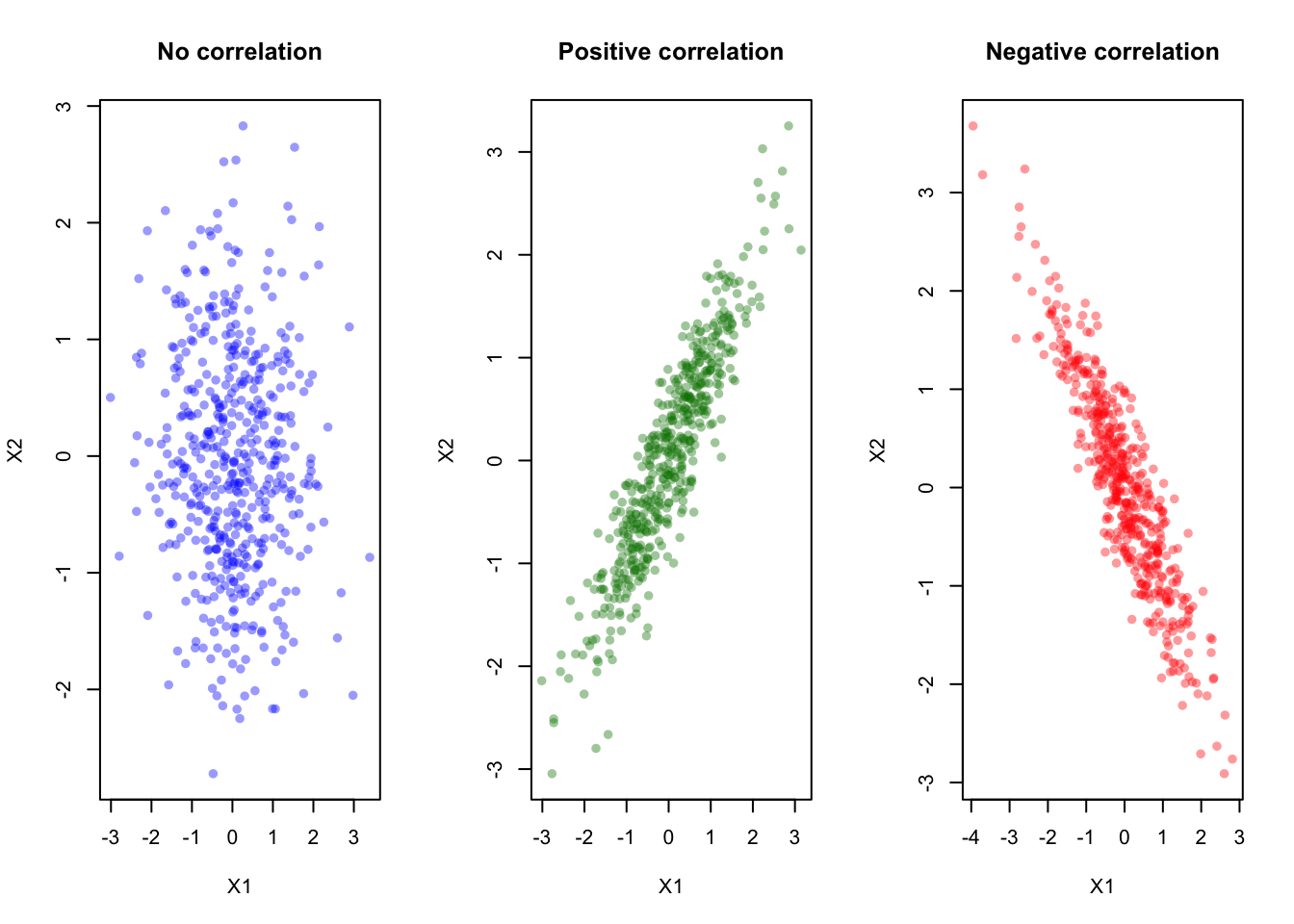
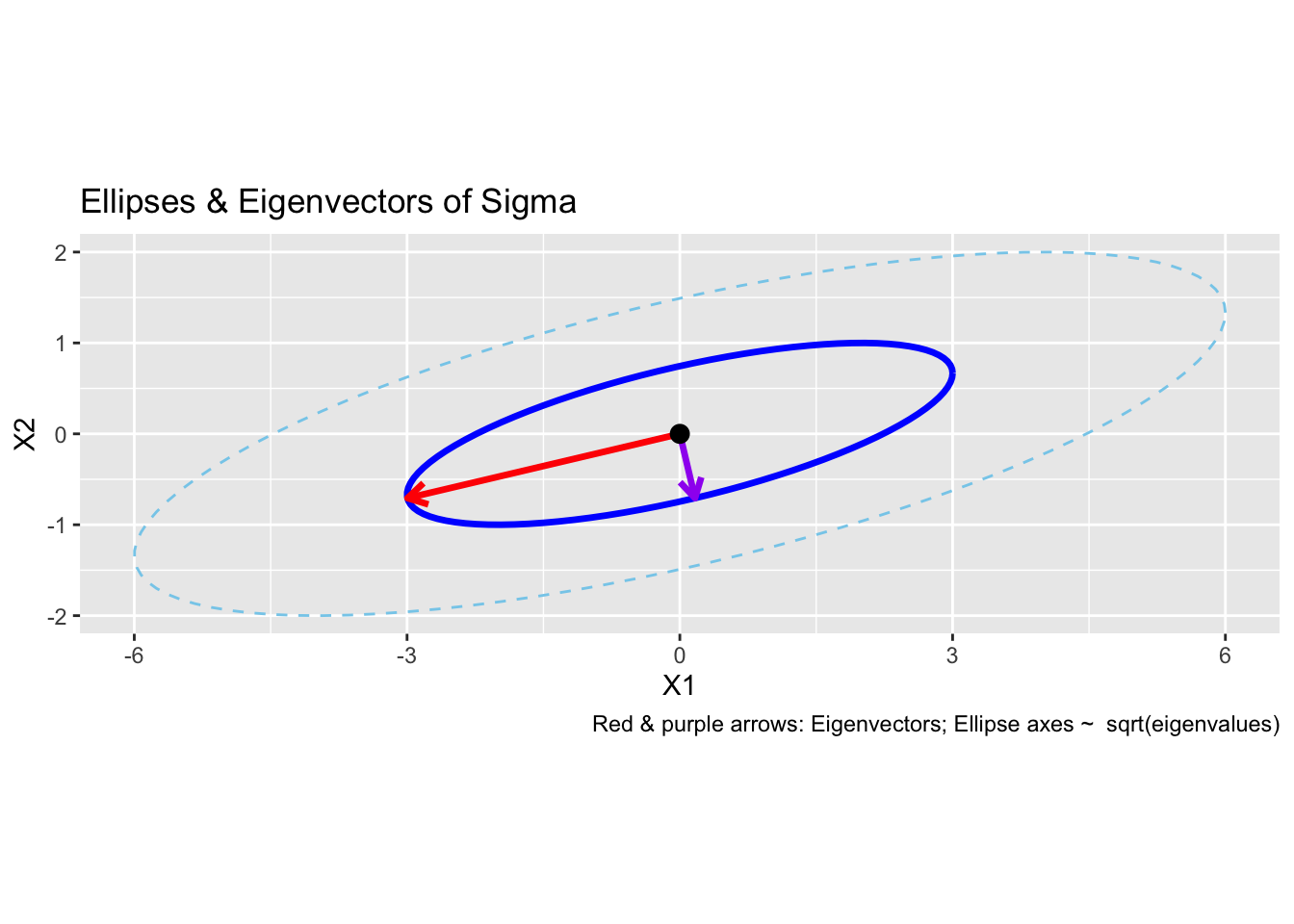
Interpretation:
library(mvtnorm)
library(ggplot2)

mu = c(0, 0)
Sigma = matrix(c(1, 0.7, 0.7, 1), 2)

# Create grid
x = seq(-3, 3, length=100)
y = seq(-3, 3, length=100)
grid = expand.grid(x = x, y = y)

# Compute density at each grid point
grid$z = mvtnorm::dmvnorm(as.matrix(grid),
                           mean = mu, sigma = Sigma)

# Plot contours
ggplot(grid, aes(x = x, y = y, z = z)) +
  geom_contour_filled(bins = 15) +
  coord_fixed() +
  labs(title = "Bivariate Normal Density (Contours)",
       x = "X1", y = "X2", fill = "Density") +
  theme_minimal()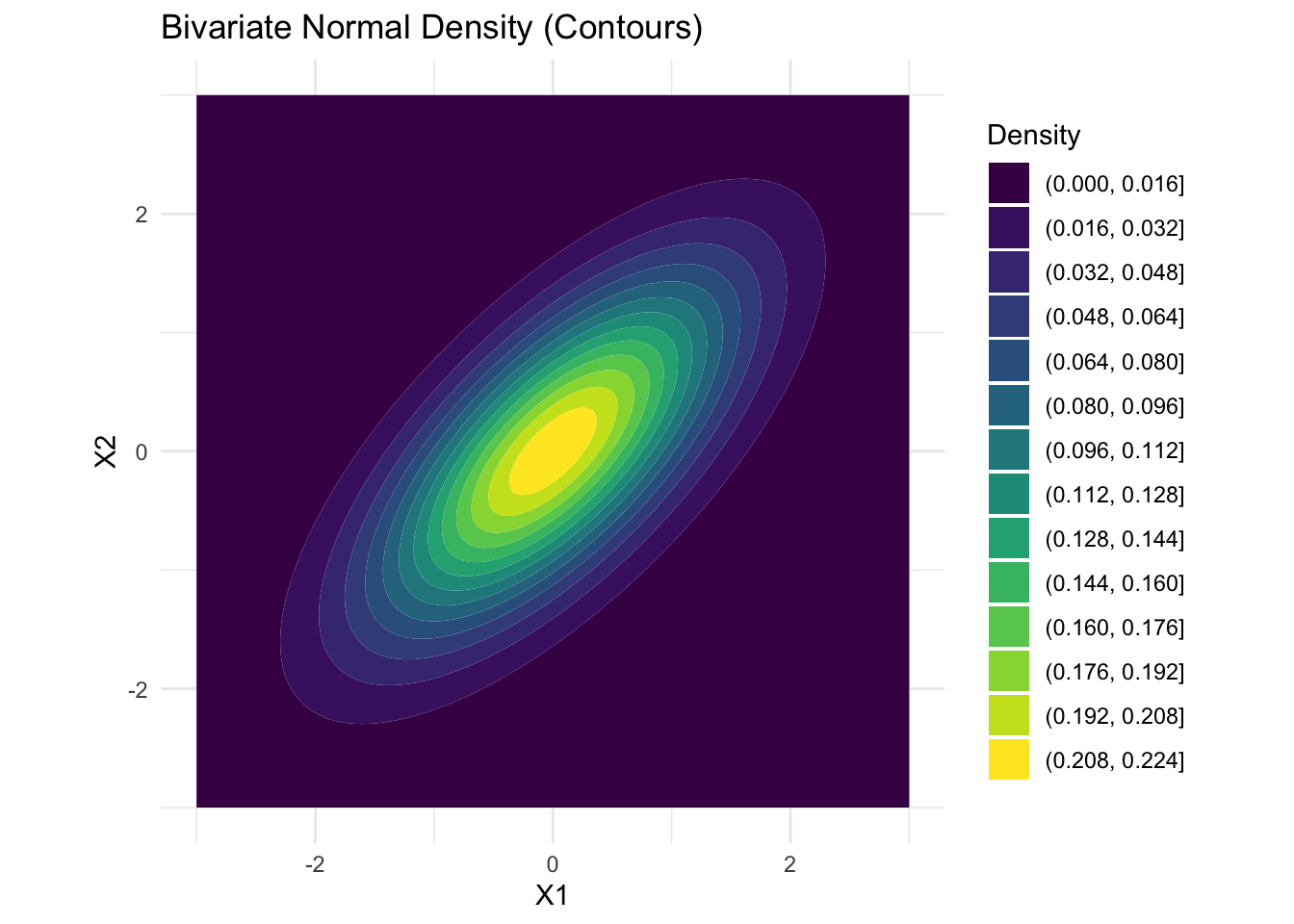
library(plotly)

z_matrix <- matrix(grid$z, nrow = length(x), byrow = FALSE)
plot_ly(x = x, y = y, z = z_matrix) %>%
  add_surface(
    contours = list(
      z = list(show = TRUE,
               usecolormap = TRUE,
               highlightcolor = "#ff0000",
               project = list(z = TRUE)))) %>%
  layout(title = "Bivariate Normal Density (Surface)",
         scene = list(xaxis = list(title = "X1"),
                      yaxis = list(title = "X2"),
zaxis = list(title = "Density")))library(MASS)
library(ggplot2)
library(mvtnorm)
# Two bivariate normals: different means, same covariance
mu1 <- c(0, 0)
mu2 <- c(2, 2)
Sigma <- matrix(c(2, 1.2, 1.2, 2), 2)
# Grid for density evaluation
x <- seq(-3, 6, length=120)
y <- seq(-3, 6, length=120)
grid <- expand.grid(x=x, y=y)
xy = as.matrix(grid)
z1 <- dmvnorm(xy, mean=mu1, sigma=Sigma)
z2 <- dmvnorm(xy, mean=mu2, sigma=Sigma)
grid$z1 = z1
grid$z2 = z2
# Find contour levels for 50% and 90%
get_density_level <- function(mu, Sigma, p) {
d2 <- qchisq(p, df=2)
detS <- det(Sigma)
norm_const <- 1/(2*pi*sqrt(detS))
exp_part <- exp(-0.5 * d2)
norm_const * exp_part
}
level_50 <- get_density_level(mu1, Sigma, 0.5)
level_90 <- get_density_level(mu1, Sigma, 0.9)
# Plot
ggplot() +
geom_contour(data=grid, aes(x=x, y=y, z=z1),
breaks=c(level_50, level_90),
color="blue", size=1.2, linetype="solid") +
geom_contour(data=grid, aes(x=x, y=y, z=z2),
breaks=c(level_50, level_90),
color="red", size=1.2, linetype="dashed") +
geom_point(aes(x=mu1[1], y=mu1[2]), color="blue", size=3) +
geom_point(aes(x=mu2[1], y=mu2[2]), color="red", size=3) +
annotate("text", x=mu1[1], y=mu1[2]-0.5,
label="mu1", color="blue") +
annotate("text", x=mu2[1], y=mu2[2]+0.5,
label="mu2", color="red") +
coord_fixed() +
labs(
title="50% (inner) and 90% (outer) Contours of Two Bivariate Normals",
x="X1", y="X2",
caption="Density peaks at the mean for each distribution.") +
theme_minimal()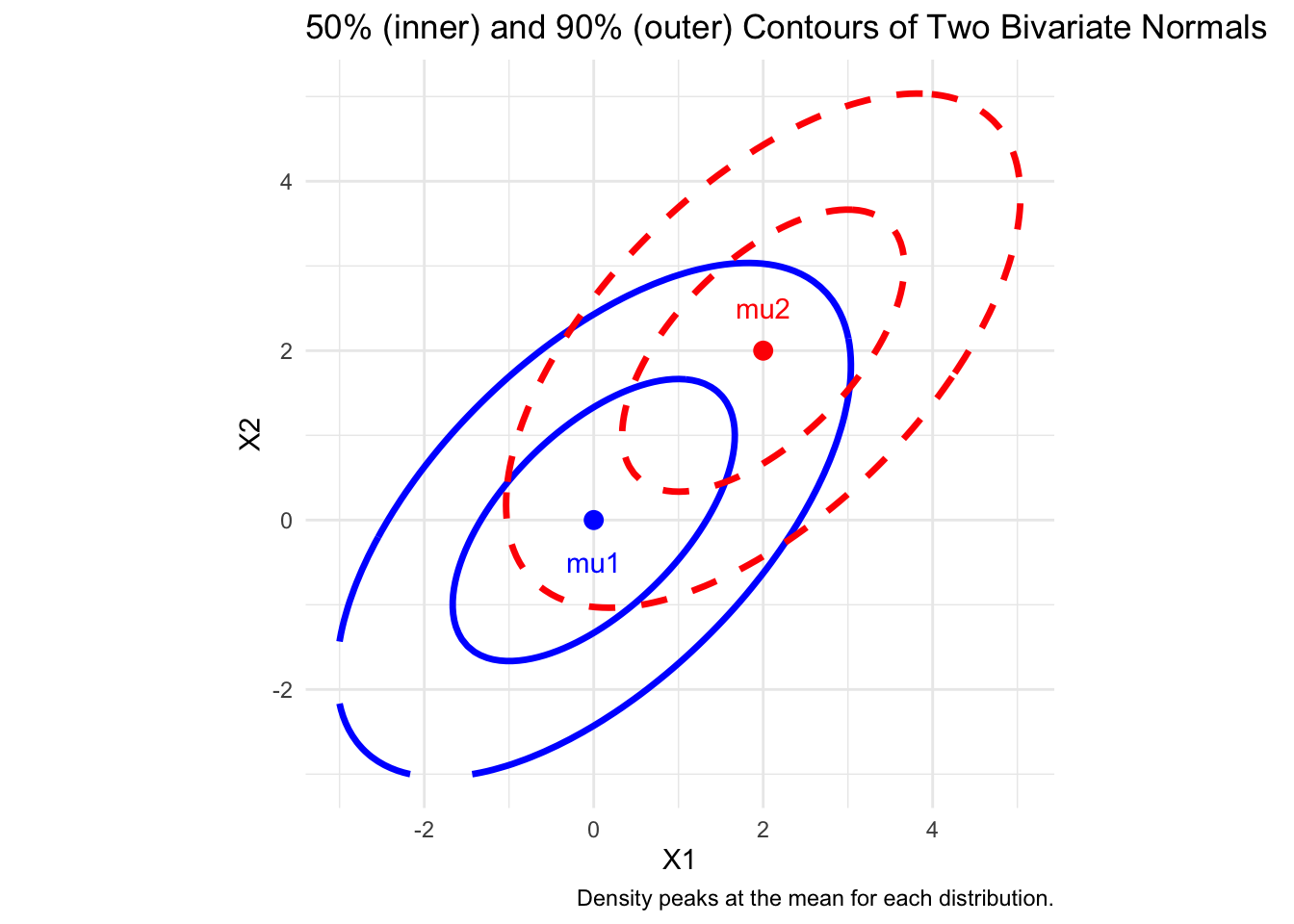
iris DatasetThe iris dataset is a classic and widely used dataset in R, commonly employed for statistical analysis, machine learning, and data visualization. It is built into R and can be loaded directly. Let’s compute the overall measures of the dataset.
# Use iris measurements
X <- iris[, 1:4]
head(X)
Sepal.Length Sepal.Width Petal.Length Petal.Width
1 5.1 3.5 1.4 0.2
2 4.9 3.0 1.4 0.2
3 4.7 3.2 1.3 0.2
4 4.6 3.1 1.5 0.2
5 5.0 3.6 1.4 0.2
6 5.4 3.9 1.7 0.4# compute covariance
S <- cov(X)
print(S) Sepal.Length Sepal.Width Petal.Length Petal.Width
Sepal.Length 0.6856935 -0.0424340 1.2743154 0.5162707
Sepal.Width -0.0424340 0.1899794 -0.3296564 -0.1216394
Petal.Length 1.2743154 -0.3296564 3.1162779 1.2956094
Petal.Width 0.5162707 -0.1216394 1.2956094 0.5810063eig <- eigen(S)
lambda <- eig$values# Generalized variance: product of eigenvalues
gen_var <- prod(lambda)
# Generalized standard deviation: sqrt of product
gen_sd <- sqrt(prod(lambda))
# Total variance: sum of eigenvalues
total_var <- sum(lambda)
library(tibble)
result = tibble(
"Generalized variance" = gen_var,
"Generalized standard deviation" = gen_sd,
"Total variance" = total_var
)
print(t(result)) [,1]
Generalized variance 0.00191273
Generalized standard deviation 0.04373476
Total variance 4.57295705# Normal Q-Q plots for all variables in iris[, 1:4]
par(mfrow = c(2,2))
for (i in 1:4) {
qqnorm(iris[,i], main = colnames(iris)[i])
qqline(iris[,i], col = "blue", lwd = 2)
}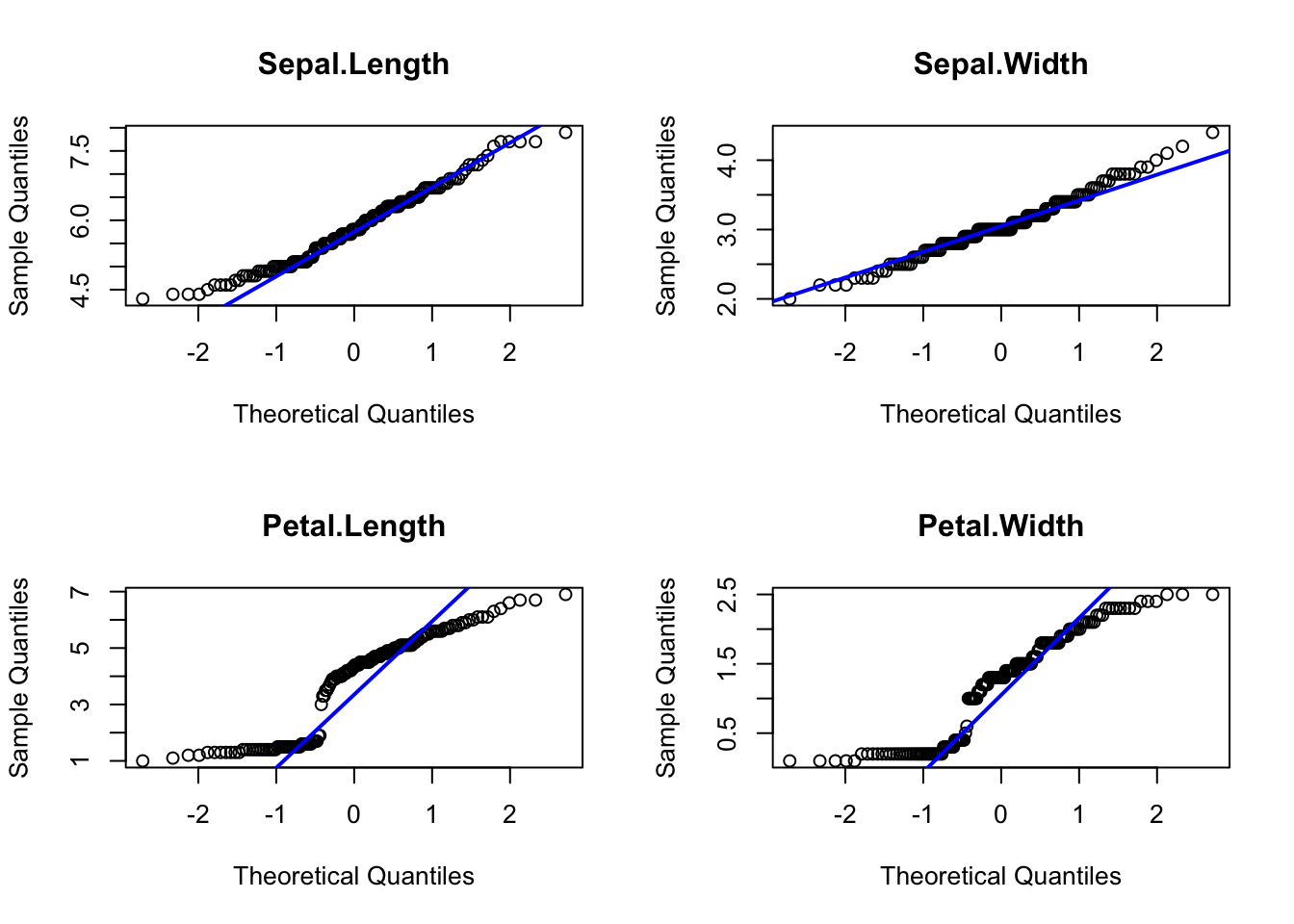
Interpretation:
# Also look at scatterplots for pairs of variables
pairs(iris[,1:4], main = "Scatterplots: Iris Variables")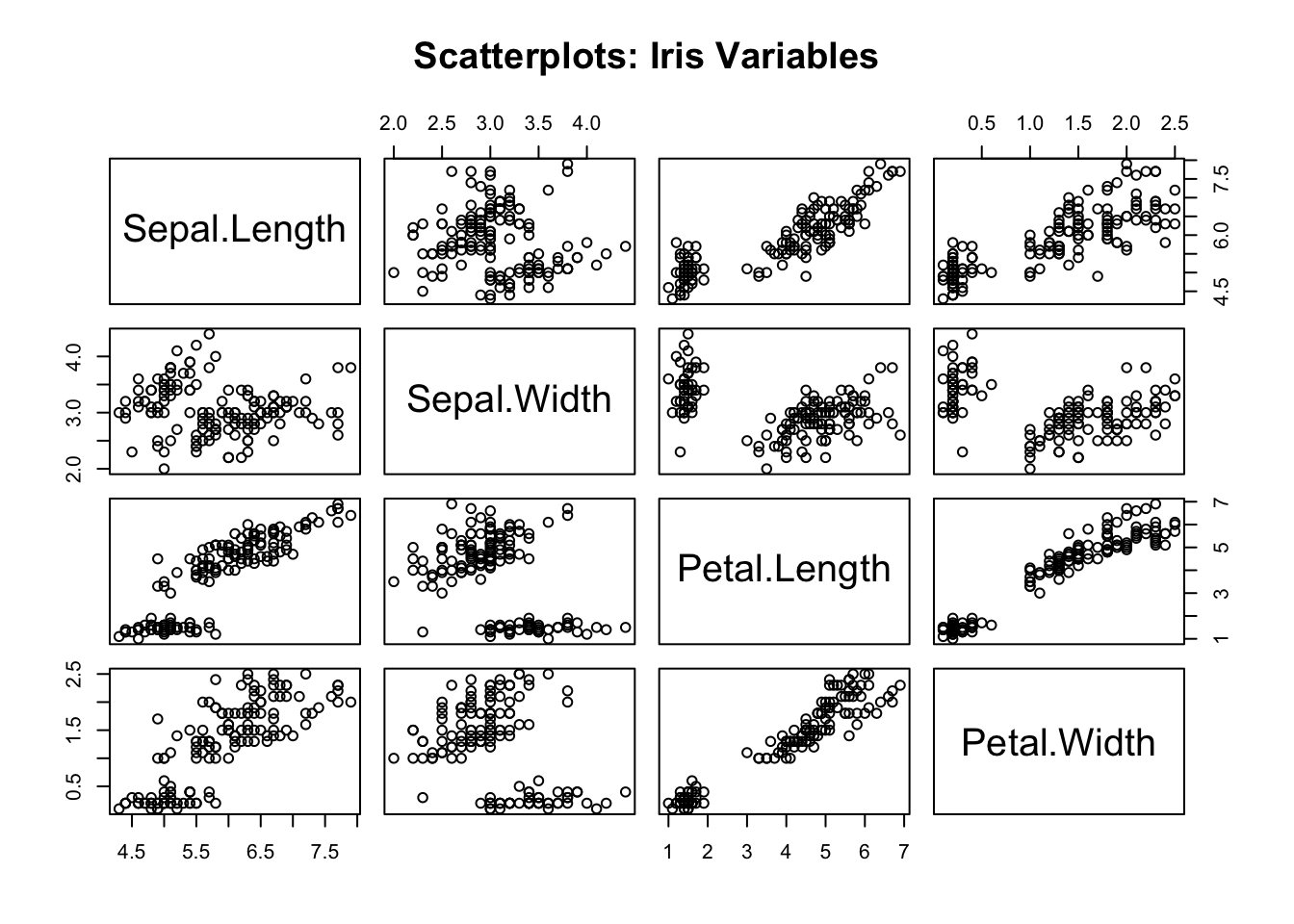
Interpretation: - Outliers, nonlinear patterns, or heavy tails in these scatterplots suggest deviations from the multivariate normal model.
The Shapiro-Wilk test is a statistical test for normality. If the p-value is small (typically <0.05), we reject the null hypothesis of normality.
Test statistic: A weighted correlation between the x_{(j)} and the q_{(j)}: W = \left( \frac{\sum_{i = 1}^n a_j(x_{(i)} - \bar{x})(q_{(i)} - \bar{q}) }{\sqrt{\sum_{i = 1}^n a_j^2(x_{(i)} - \bar{x})^2}\sqrt{\sum_{i = 1}^n (q_{(i)} - \bar{q})^2}} \right)^2.
We expect values of W to be close to one if the sample arises from a normal population.
Reject the null hypothesis that data were sampled from a normal distribution if W is too small.
This test has been extended to p-dimensional normal distributions.
The Shapiro-Wilk test only checks marginal normality, not joint/multivariate normality when applied to each variable individually. This univariate test is implemented in the R function shapiro.test. To perform multivariate normaltiy check, we need to use the multivariate version of the Shapiro-Wilk test using the function mvShapiro.Test from the package mvShapiroTest.
# Shapiro-Wilk test for each of the four numeric iris variables
apply(iris[, 1:4], 2, shapiro.test)
$Sepal.Length
Shapiro-Wilk normality test
data: newX[, i]
W = 0.97609, p-value = 0.01018
$Sepal.Width
Shapiro-Wilk normality test
data: newX[, i]
W = 0.98492, p-value = 0.1012
$Petal.Length
Shapiro-Wilk normality test
data: newX[, i]
W = 0.87627, p-value = 7.412e-10
$Petal.Width
Shapiro-Wilk normality test
data: newX[, i]
W = 0.90183, p-value = 1.68e-08library(mvShapiroTest)
# multivariate Shapiro-Wilk test
mvShapiro.Test(as.matrix(iris[, 1:4]))
    Generalized Shapiro-Wilk test for Multivariate Normality by
    Villasenor-Alva and Gonzalez-Estrada

data:  as.matrix(iris[, 1:4])
MVW = 0.97327, p-value = 1.655e-06mtcars)
Using the mtcars dataset, explore the relationship between mpg (miles per gallon) and hp (horsepower):
mpg vs hp and describe the pattern.mpg and hp.library(mvtnorm)
library(ggplot2)
data(mtcars)
X <- mtcars[, c("mpg", "hp")]
mu <- colMeans(X)
Sigma <- cov(X)
p <- ggplot(X, aes(x = mpg, y = hp)) +
geom_point(size = 2, alpha = 0.7) +
theme_minimal() +
labs(title = "mtcars: mpg vs hp")
x_seq <- seq(min(X$mpg) - 2, max(X$mpg) + 2, length = 100)
y_seq <- seq(min(X$hp) - 10, max(X$hp) + 10, length = 100)
grid <- expand.grid(mpg = x_seq, hp = y_seq)
grid$z <- dmvnorm(as.matrix(grid), mean = mu, sigma = Sigma)
get_density_level <- function(Sigma, p) {
d2 <- qchisq(p, df=2)
detS <- det(Sigma)
norm_const <- 1/(2*pi*sqrt(detS))
exp_part <- exp(-0.5 * d2)
norm_const * exp_part
}
level_50 <- get_density_level(Sigma, 0.5)
level_90 <- get_density_level(Sigma, 0.9)
p +
geom_contour(data = grid, aes(z = z), breaks = level_50,
color = "blue", linetype = "solid", size = 1.2) +
geom_contour(data = grid, aes(z = z), breaks = level_90,
color = "red", linetype = "dashed", size = 1.2) +
labs(subtitle = "Blue: 50% contour | Red dashed: 90% contour")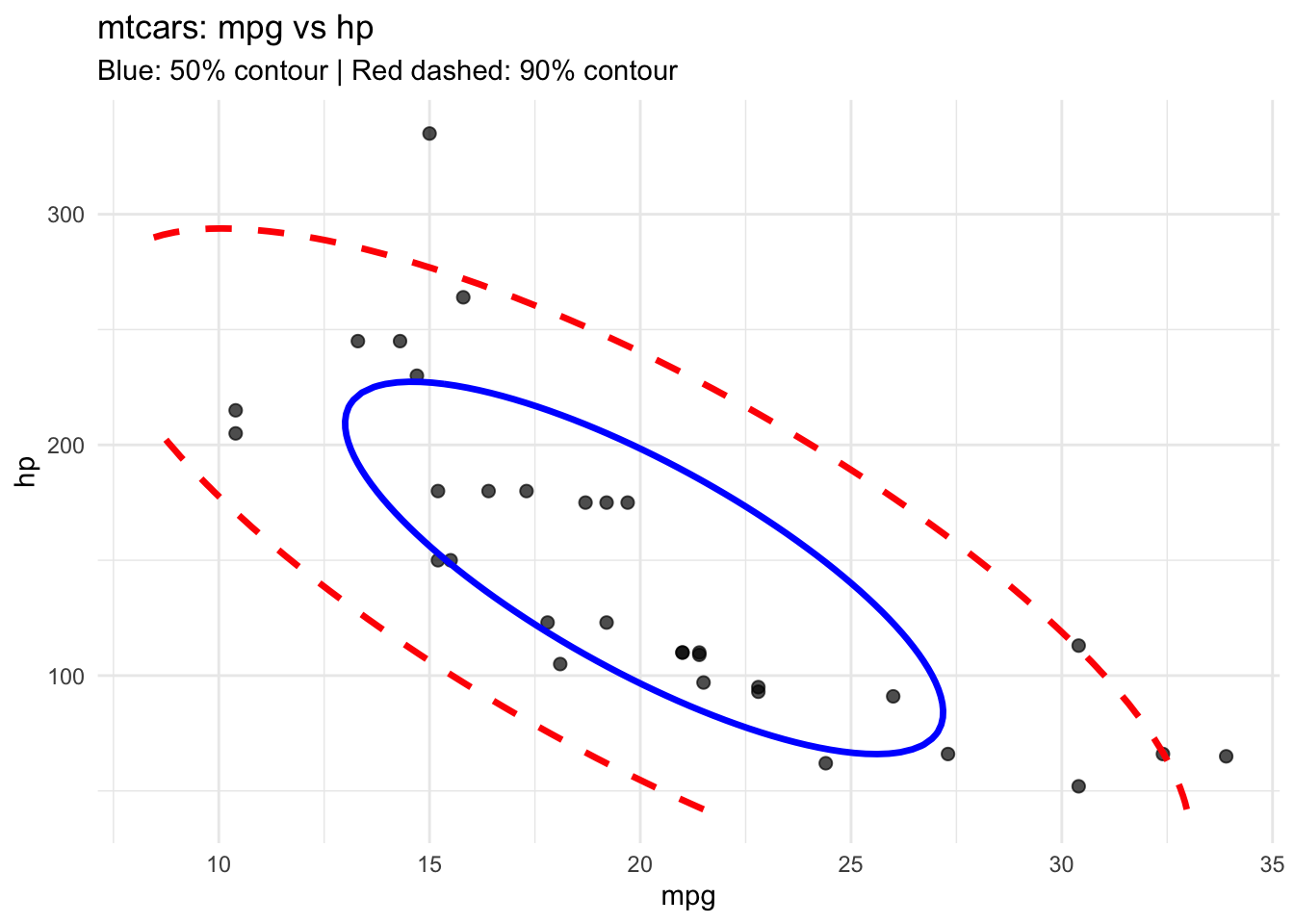
par(mfrow = c(1,2))
qqnorm(X$mpg, main = "Normal Q-Q: mpg"); qqline(X$mpg, col = "blue")
qqnorm(X$hp, main = "Normal Q-Q: hp"); qqline(X$hp, col = "blue")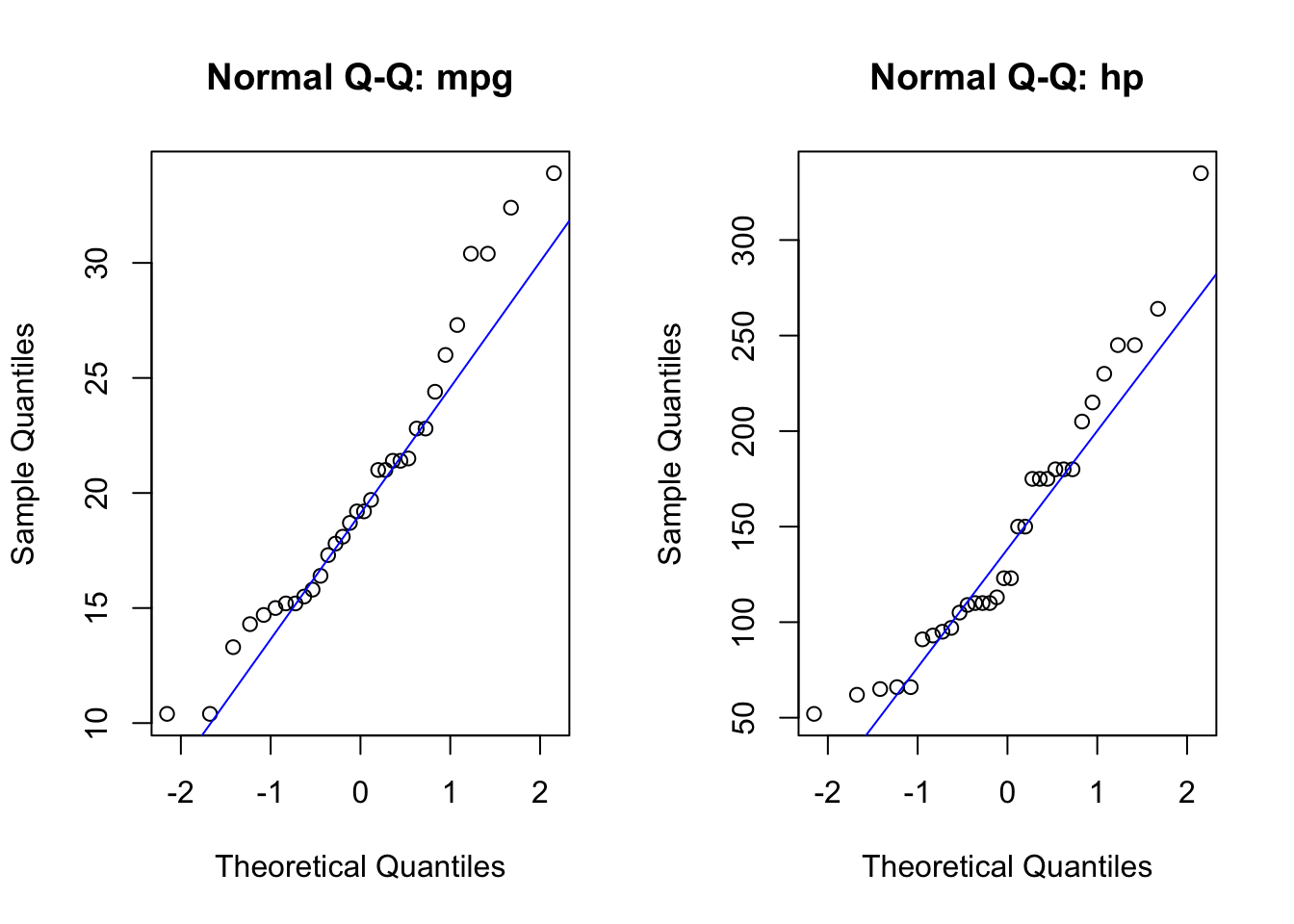
par(mfrow = c(1,1))

sw1 <- shapiro.test(X$mpg)
sw2 <- shapiro.test(X$hp)
cat("Shapiro-Wilk p-value for mpg:", signif(sw1$p.value, 3), "\n")
Shapiro-Wilk p-value for mpg: 0.123 cat("Shapiro-Wilk p-value for hp:", signif(sw2$p.value, 3), "\n")Shapiro-Wilk p-value for hp: 0.0488 # 5. multivariate Shapiro-Wilk test
mvShapiro.Test(as.matrix(X[, c("mpg", "hp")]))
    Generalized Shapiro-Wilk test for Multivariate Normality by
    Villasenor-Alva and Gonzalez-Estrada

data:  as.matrix(X[, c("mpg", "hp")])
MVW = 0.92425, p-value = 0.00639
Interpretation:
If observations show gross departures from normality, it might be necessary to transform some of the variables to near normality. Some recommendations are given below.
| Original scale | Transformed scale |
|---|---|
| Right skewed data | \sqrt{x} log(x) 1/\sqrt{x} 1/x |
| x are counts | \sqrt{x} |
| x are proportions \hat{p} | \mathrm{logit}(\hat{p}) = \frac{1}{2} \log\left(\frac{\hat{p}}{1 - \hat{p}}\right) |
| x are correlations r | Fisher’s z(r) = \frac{1}{2} \log\left(\frac{1 + r}{1 - r}\right) |
iris Datalibrary(ggplot2)
library(dplyr)
df = iris
# Bin along x
x_proj <- df %>%
dplyr::mutate(y = 2)
# Bin along y
y_proj <- df %>%
mutate(x = 4)
ggplot(df,
aes(x = Sepal.Length,
y = Sepal.Width, color = Species)) +
geom_point(size = 1, alpha = 0.7) +
geom_dotplot(data = x_proj,
aes(x = Sepal.Length, y=2, fill = Species),
binaxis = "x", stackdir = "down", dotsize = 0.5,
position = position_nudge(y=1.5),
inherit.aes = FALSE) +
geom_dotplot(data = y_proj,
aes(x=3.5, y = Sepal.Width, fill = Species),
binaxis = "y", stackdir = "down", dotsize = 0.5,
position = position_nudge(x=0),
inherit.aes = FALSE) +
coord_equal() +
theme_minimal()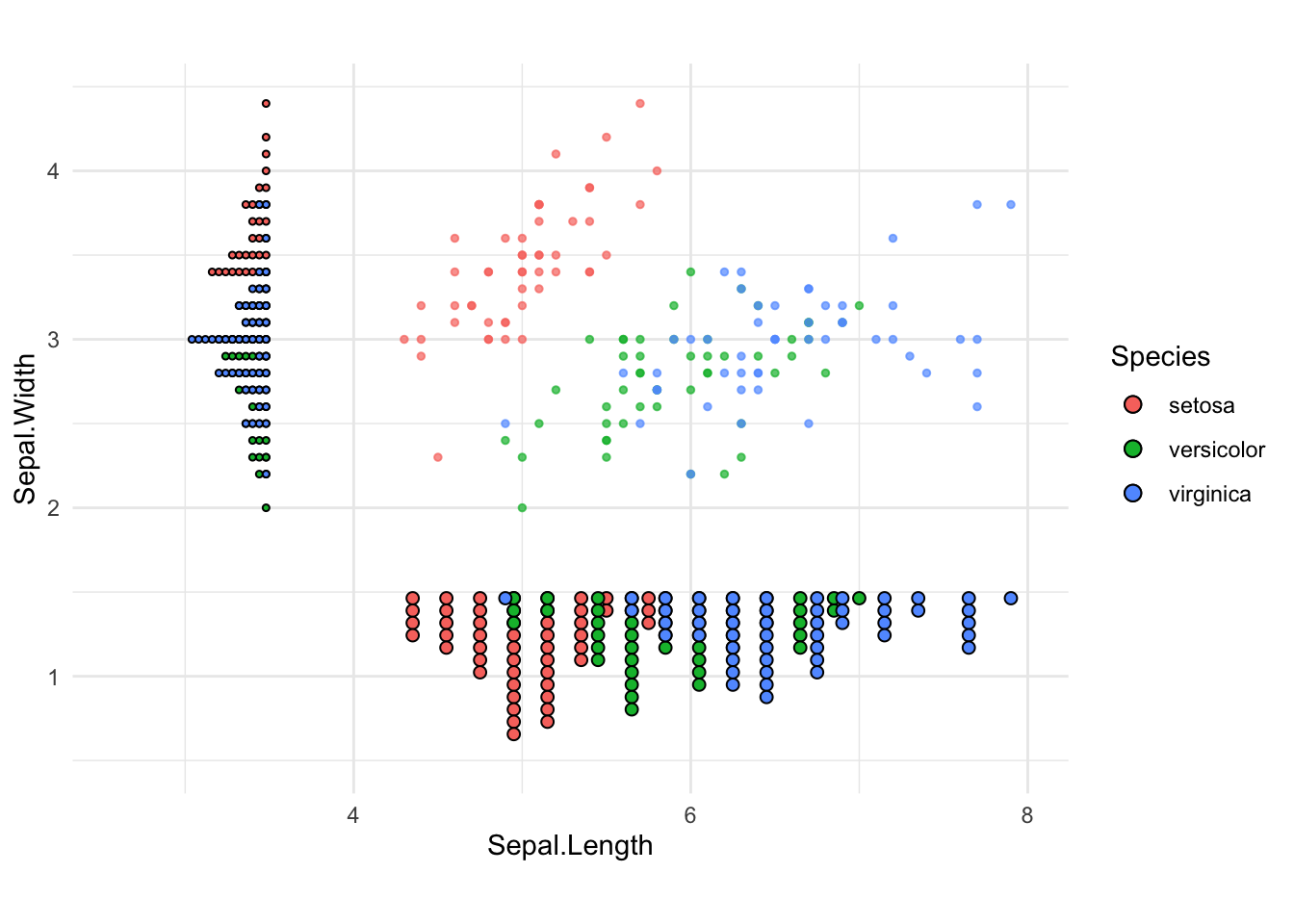
## Finding mahalanobis distance
xbar = colMeans(df[, 1:4])
bvar = cov(df[,1:4])
dsq = mahalanobis(x=df[,1:4], center=xbar, cov=bvar)

## Cutoff value for distances from a chisquare distribution
cutoff = qchisq(p=0.95, df=nrow(bvar)) # 95th percentile

## plot observations whose distance is greater than cutoff value
flag = dsq>cutoff
cbind(df[flag,1:4], d_sqaure=dsq[flag])
Sepal.Length Sepal.Width Petal.Length Petal.Width d_sqaure
16 5.7 4.4 1.5 0.4 9.712790
42 4.5 2.3 1.3 0.3 11.424029
107 4.9 2.5 4.5 1.7 10.137804
115 5.8 2.8 5.1 2.4 11.410573
118 7.7 3.8 6.7 2.2 12.813073
132 7.9 3.8 6.4 2.0 13.101093
135 6.1 2.6 5.6 1.4 12.880331
136 7.7 3.0 6.1 2.3 9.656936
142 6.9 3.1 5.1 2.3 12.441384# Add flag for outliers
df = df %>%
mutate(flag = dsq > cutoff)
# Projections
x_proj = df %>% mutate(y = 2)
y_proj = df %>% mutate(x = 4)
ggplot(df, aes(x = Sepal.Length, y = Sepal.Width)) +
# Scatter plot with flagged points highlighted
geom_point(aes(color = Species,
shape = flag, # Different shape for flagged
size = ifelse(flag, 3, 1.5)), # Larger for flagged
alpha = 0.7) +
# X-axis projection
geom_dotplot(
data = x_proj,
aes(x = Sepal.Length, y = 2, fill = Species),
binaxis = "x", stackdir = "down", binwidth = 0.15,
dotsize = 0.5,
position = position_nudge(y = 1.5),
inherit.aes = FALSE
) +
# Y-axis projection
geom_dotplot(
data = y_proj,
aes(x = 3.5, y = Sepal.Width, fill = Species),
binaxis = "y", stackdir = "down", binwidth = 0.15,
dotsize = 0.5,
position = position_nudge(x = 0),
inherit.aes = FALSE
) +
scale_shape_manual(
values = c(
`FALSE` = 16,
`TRUE` = 21)) + # open circle for outliers
scale_size_identity() +
coord_equal() +
theme_minimal()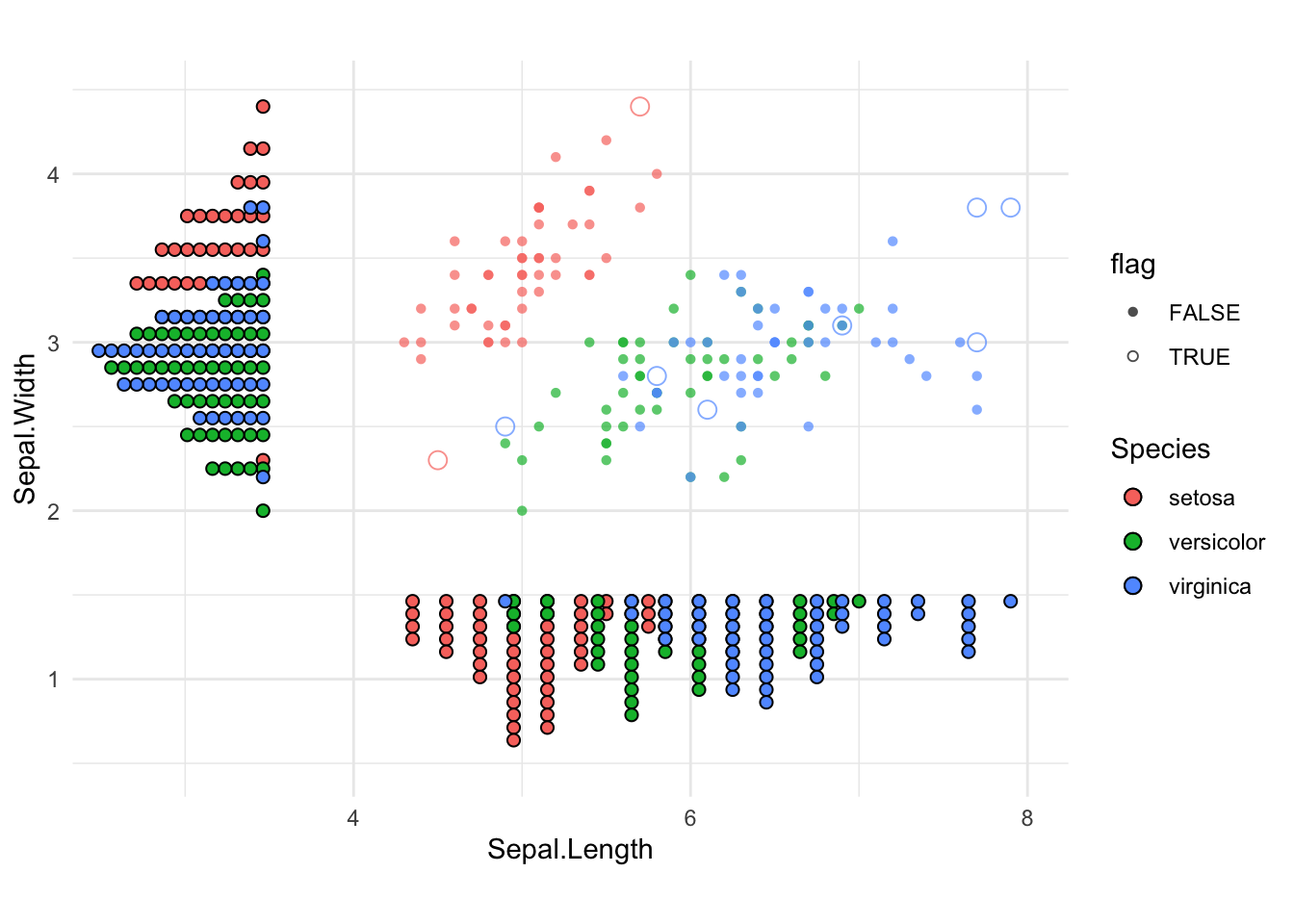
These data were taken from an example in the Johnson and Wichern book, Applied Multivariate Analysis in the file sweat.dat. Three measurements on perspiration were taken from each woman in a random sample of 20 healthy women: X_1= sweat rate, X_2= sodium concentration, X_3=potassium concentration.
dat = read.table("sweat.dat", header=F,
                 col.names=c("subject", "x1", "x2", "x3") )
head(dat)
subject x1 x2 x3
1 1 3.7 48.5 9.3
2 2 5.7 65.1 8.0
3 3 3.8 47.2 10.9
4 4 3.2 53.2 12.0
5 5 3.1 55.5 9.7
6 6 4.6 36.1 7.9X = as.matrix(dat[,c(2,3)])xbar = colMeans(X)
S = cov(X)
S x1 x2
x1 2.879368 10.0100
x2 10.010000 199.7884grid <- expand.grid(
x = seq(min(X[,1]) - 0.5, max(X[,1]) + 0.5, length = 50),
y = seq(min(X[,2]) - 0.5, max(X[,2]) + 0.5, length = 50)
)
gridmat = as.matrix(grid)
dens <- mvtnorm::dmvnorm(x=gridmat,
mean = xbar,
sigma = S)
head(data.frame(grid, f = dens)) x y f
1 1.000000 13 0.0002244281
2 1.163265 13 0.0002563175
3 1.326531 13 0.0002894749
4 1.489796 13 0.0003232772
5 1.653061 13 0.0003570021
6 1.816327 13 0.0003898505# mean, var
a1 = c(0.5, 0.5)
a2 = c(1, -1)
# mean and variance of 0.5*X1 + 0.5*X2
tibble(
mean = sum(a1 * xbar),
variance = drop(t(a1) %*% S %*% a1)
)# A tibble: 1 × 2
mean variance
<dbl> <dbl>
1 25.0 55.7# mean and variance of X1 - X2
tibble(
mean = sum(a2 * xbar),
variance = drop(t(a2) %*% S %*% a2)
)# A tibble: 1 × 2
mean variance
<dbl> <dbl>
1 -40.8 183.grid$z = dens
ggplot(grid, aes(x = x, y = y, z = z)) +
geom_contour_filled(bins = 10) +
#coord_equal() +
labs(title = "Bivariate Normal Density (Contours)",
x = "Sweat rate", y = "Sodium concentration",
fill = "Density") +
theme_minimal()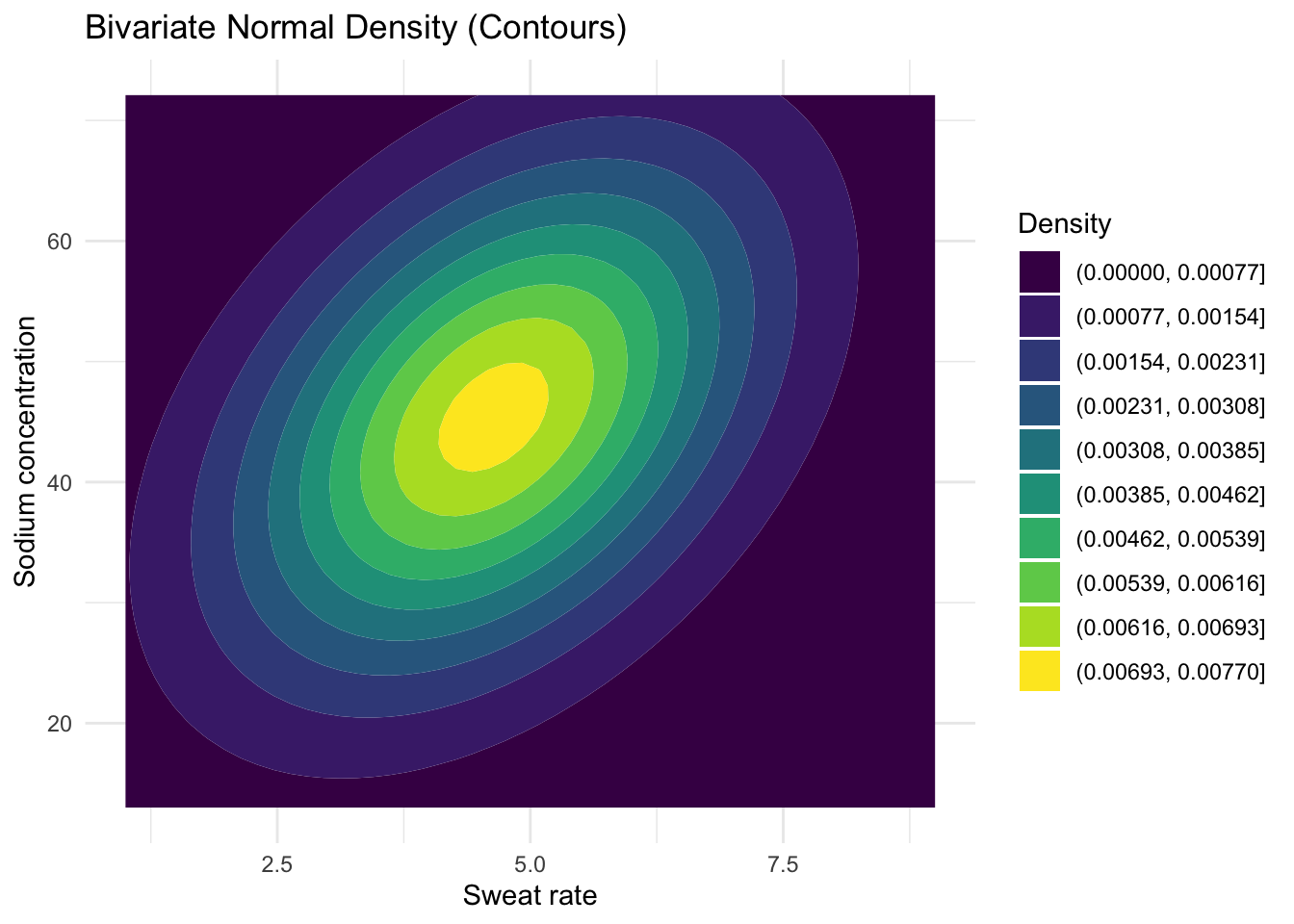
Xc = X - matrix(1, nrow=nrow(X), ncol=1) %*% t(xbar)
Q = diag( Xc %*% solve(S) %*% t(Xc) )
# or use T2 = rowSums( (Xc %*% solve(S)) * Xc)
cut = qchisq(.95, df=2)
mean(Q<=cut) # empirical coverage
[1] 0.95dat1 = as.data.frame(X) %>%
mutate(inside = Q<=cut)
ggplot(dat1, aes(x=x1, y=x2, color=inside)) +
geom_point(size=2, alpha=.8) +
scale_color_manual(values = c("FALSE"="grey60",
"TRUE"="tomato")) +
labs(color = "Inside 95% ellipse?")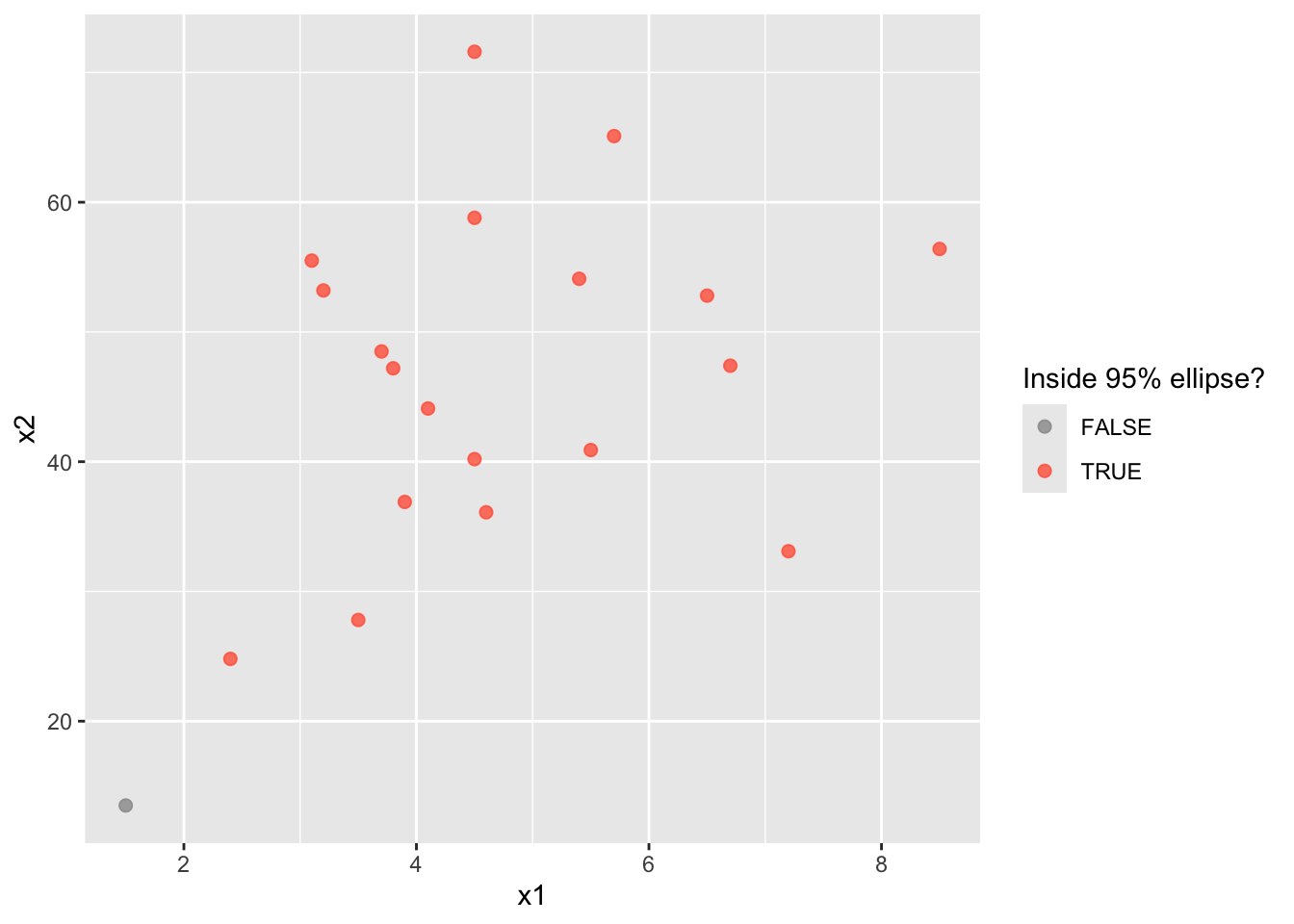
E = eigen(S)

# Ellipse directions
E$vectors
[,1] [,2]
[1,] 0.0506399 -0.9987170
[2,] 0.9987170 0.0506399# lengths
sqrt(E$values) * sqrt(cut)[1] 34.641972 3.769698tibble(
"Generalized variance" = prod(E$values),
"Total variance" = sum(E$values)
)# A tibble: 1 × 2
`Generalized variance` `Total variance`
<dbl> <dbl>
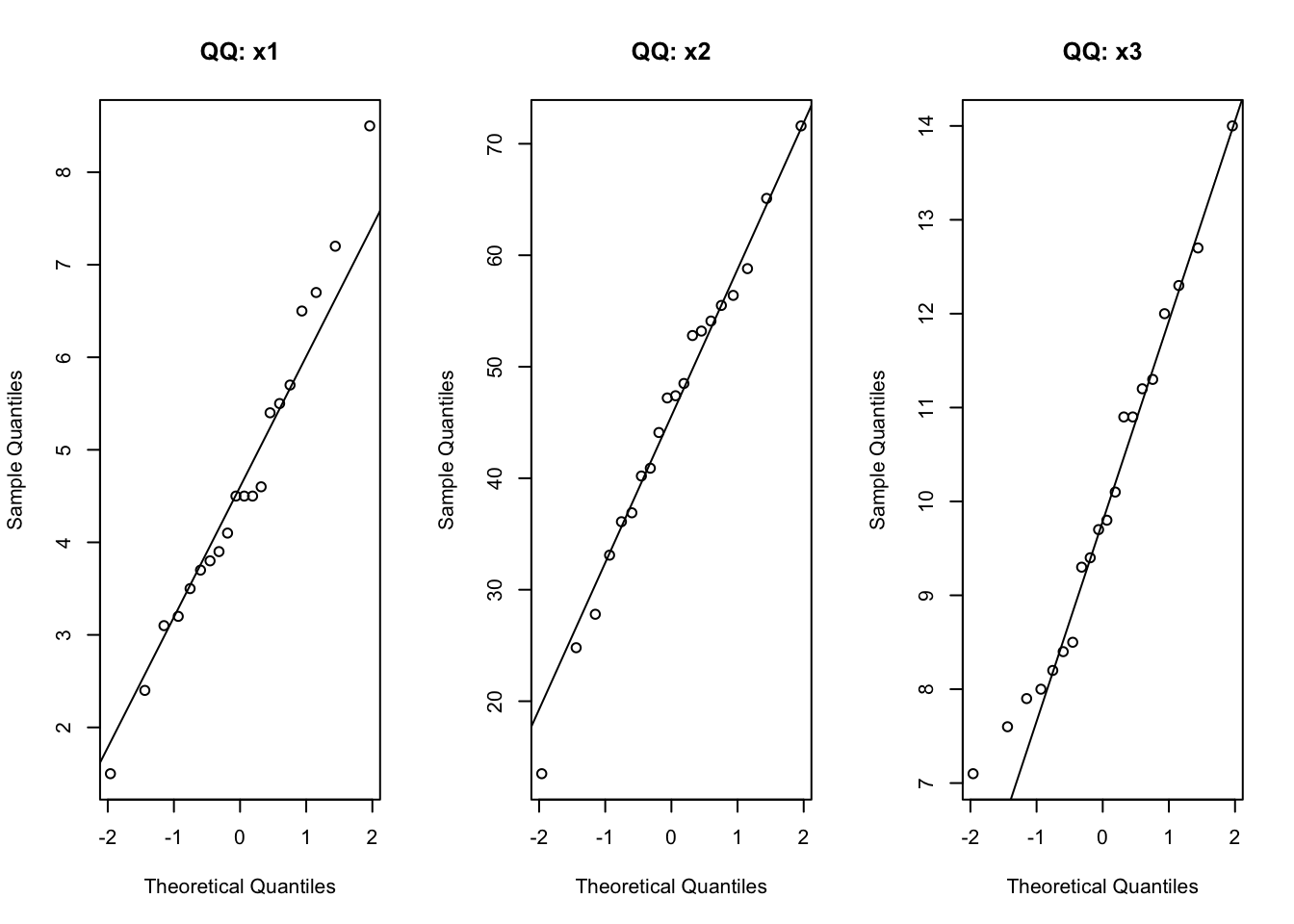
1 475. 203.par(mfrow = c(1,3))
for (nm in colnames(dat[,2:4])) {
qqnorm(dat[, nm], main = paste("QQ:", nm))
qqline(dat[, nm])
}
par(mfrow = c(1,1))

apply(dat[, 2:4], 2, function(v) shapiro.test(v)$p.value)
x1 x2 x3
0.8689242 0.9861883 0.6232620 mvShapiroTest::mvShapiro.Test(as.matrix(dat[,2:4]))
    Generalized Shapiro-Wilk test for Multivariate Normality by
    Villasenor-Alva and Gonzalez-Estrada

data:  as.matrix(dat[, 2:4])
MVW = 0.94446, p-value = 0.2567dat1 = as.matrix(dat[,2:4])
xbar1 = colMeans(dat1)
S1 = cov(dat1)
Xc1 = dat1 - matrix(1,nrow(dat1), 1) %*% t(xbar1)
d2 = diag( (Xc1) %*% solve(S1) %*% t(Xc1) )
cut2 = qchisq(.975, df=ncol(dat1))
sum(d2>cut2)[1] 0