Numerical Summaries and Visualization of Multivariate Data
Multivariate Normal Distribution
Comparing Centers of Distributions
(Hotelling T^2, MANOVA, Repeated Measures)
Principal Component Analysis
(Summarizing data in lower dimensions)
Exploratory Factor Analysis
(What to do when the variables of interest cannot be directly observed.)
Multi-Dimensional Scaling
Cluster Analysis
Discriminant Analysis and Classification
(Including linear discriminants, logistic regression, classification trees, and random forests)
1.2 Objectives of Multivariate Analysis
Understand dependencies among variables: What is the nature of associations among variables?
Prediction: If variables are associated, then we might be able to predict the value of some of them given information on the others. (Statistical inference)
Hypothesis testing: Are differences in sets of response means for two or more groups large enough to be distinguished from sampling variation? (Statistical inference)
Dimensionality reduction: Can we reduce the dimensionality of the problem by considering a small number of (linear) combinations of a large number of measurements without losing important information?
Principal Components
Factor Analysis
Multidimensional Scaling
Grouping (Cluster Analysis): Identify groups of “similar” units using a common set of measured traits.
Classification: Classify units into previously defined groups using a common set of measured traits.
Choose a download mirror (any CRAN mirror will work).
Click on the download link for the latest R version for Windows and follow the instruction
Install RStudio
RStudio has multiple panes in the window, open by default: one for writing and editing code, another for executing it, another for plots produced or help, and another that lists the R data objects available. RStudio can be download for free at https://posit.co/download/rstudio-desktop/.
1.3.2 Introduction to R Programming
Some Tips: R Working Environment
Whenever you work with R for data analysis, it is recommended to load all the packages used in the data analysis pipeline before the function sessionInfo(). In addition, if random numbers are generated, it is also recommended to set random seed to ensure reproducibility using set.seed().
# Numeric, logical, character types3.14159# numeric
[1] 3.14159
Code
T # logical, can also be TRUE
[1] TRUE
Code
F # logical, can also be FALSE
[1] FALSE
Code
"Stat 4750/5750"# character
[1] “Stat 4750/5750”
Code
# Basic arithmetic operators1+2
[1] 3
Code
20-3
[1] 17
Code
2*6
[1] 12
Code
4/3
[1] 1.333333
Code
2^4
[1] 16
Code
-3.14
[1] -3.14
Code
(1+2) * (3/4) # use parenthesis
[1] 2.25
Code
2==1
[1] FALSE
Code
# Vectorc() # empty vector
NULL
Code
c(1, 2, 3, 4)
[1] 1 2 3 4
Code
1:4
[1] 1 2 3 4
Code
# Look up the function help, 3 ways:# Following 3 ways work for most functions# 1. search in help pane?sum # 2. use ?sum(1:4) # 3. move your cursor to the function, then press F1, the easiest way
[1] 10
Code
# The 3rd way doesn't work for functions having some symbols, like +, ==, %*%# 1. search in help pane?`+`# 2. use ? but wrap the symbol with ``
   Weight.lbs      Height.in        Gender
 Min.   :120.0   Min.   :60.00   Female:5
 1st Qu.:132.5   1st Qu.:62.00   Male  :2
 Median :145.0   Median :65.00
 Mean   :147.9   Mean   :64.71
 3rd Qu.:162.5   3rd Qu.:67.00
 Max.   :180.0   Max.   :70.00
a b c d e
a 23825 20700 26495 24590 21465
b 20700 18000 22980 21360 18660
c 26495 22980 29569 27358 23843
d 24590 21360 27358 25381 22151
e 21465 18660 23843 22151 19346
This can be written as n rows or as p columns
X_{n \times p} =
\begin{bmatrix}
\mathbf{x}_1^{\prime} \\
\mathbf{x}_2^{\prime} \\
\vdots \\
\mathbf{x}_n^{\prime}
\end{bmatrix}
=
\begin{bmatrix}
\mathbf{x}_1^{\top} \\
\mathbf{x}_2^{\top} \\
\vdots \\
\mathbf{x}_n^{\top}
\end{bmatrix}
=
\left[ \mathbf{x}_1, \mathbf{x}_2, \ldots, \mathbf{x}_p \right]
where both \prime and \top represent matrix transpose.
Common types of objects for data analysis are numeric, character, logical, factors, and dates. Character data do not have numerical values, such as names of people or words in a book, Logical data takes values of true or false and can be used to make decisions.
For each of the following commands, either explain why they should be errors, or explain the non-erroneous result.
x <- c("1","2","3")
max(x)
sort(x)
sum(x)
For the next two commands, either explain their results, or why they should produce errors.
y <- c("1",3,4)
y[2] + y[3]
For the next two commands, either explain their results, or why they should produce errors.
z <- data.frame(z1="1", z2=3, z3=5)
z[1,2] + z[1,3]
View Solution
x is bound to a vector of characters instead of numerical values. The functions max, sort, sum should take numerical values as input, so the values in x are first converted from characters to numerical values implicitly and then the functions apply to these incorrect numerical values
y is a vector of characters, which cannot be used for addition
z is a data frame, but the variable z1 is a character while z2 and z3 are numerical. Adding z2 and z3 will produce the correct results.
1.8.2 Exercise 2: Working with Matrix and Data Frames
A matrix is a 2D array, with rows and columns, much like you would have seen in linear algebra. Primarily we think of these as numeric objects. Arrays can have more than two dimensions. In multivariate analysis we are typically thinking of data in the form of a matrix, with samples/cases in the rows and variables represented as columns. Data frames are 2D arrays that could have multiple types of data in different columns. Lists are collections of possibly different length and different types of objects.
Weight.lbs Height.in Gender
Min. :120.0 Min. :60.00 Length:7
1st Qu.:132.5 1st Qu.:62.00 Class :character
Median :145.0 Median :65.00 Mode :character
Mean :147.9 Mean :64.71
3rd Qu.:162.5 3rd Qu.:67.00
Max. :180.0 Max. :70.00
Operations with Matrix and Data Frame
Extract the first row and second column of a matrix.
Select all the Male observations from a data frame.
View Solution
subset(df, Gender=="Male")
  Weight.lbs Height.in Gender
6        180        70   Male
7        165        68   Male
Transpose of a matrix
View Solution
A =matrix(c(3,1,2,4), ncol=2)A
     [,1] [,2]
[1,]    3    2
[2,]    1    4
Matrix multiplication
View Solution
B =matrix(c(1,2,3,4), ncol=2)A %*% B
     [,1] [,2]
[1,]    7   17
[2,]    9   19
View Solution
B %*% A
     [,1] [,2]
[1,]    6   14
[2,]   10   20
Matrix inversion
View Solution
solve(A)
     [,1] [,2]
[1,]  0.4 -0.2
[2,] -0.1  0.3
1.8.3 Exercise 3: Linear Algebra
Consider the linear system A X = b, where A is an n\times n positive definite matrix and b is a n-dimensional vector, the unique solution is X = A^{-1}b. Please answer the following questions:
Write an R function called my_solver() such that given inputs A and b, the function my_solver() returns the solution of the linear system, i.e., X <- my_solver(A, b).
Run the following code to get A and b.
set.seed(123)
A = matrix(c(5,1,1,6), ncol=2)
n = nrow(A)
b = rnorm(n,1)
Then use your function my_solver() to produce the answer and verify your solution. (hint: AX should be equal to b)
EPA monitors Air Quality data across the entire U.S. The file AQSdata.csv contains daily PM 2.5 concentrations and other information. Please answer the following questions using the ggplot() function for plotting. In addition make sure that all the x-axis and y-axis labels have 14 font size.
Read the data file AQSdata.csv into R.
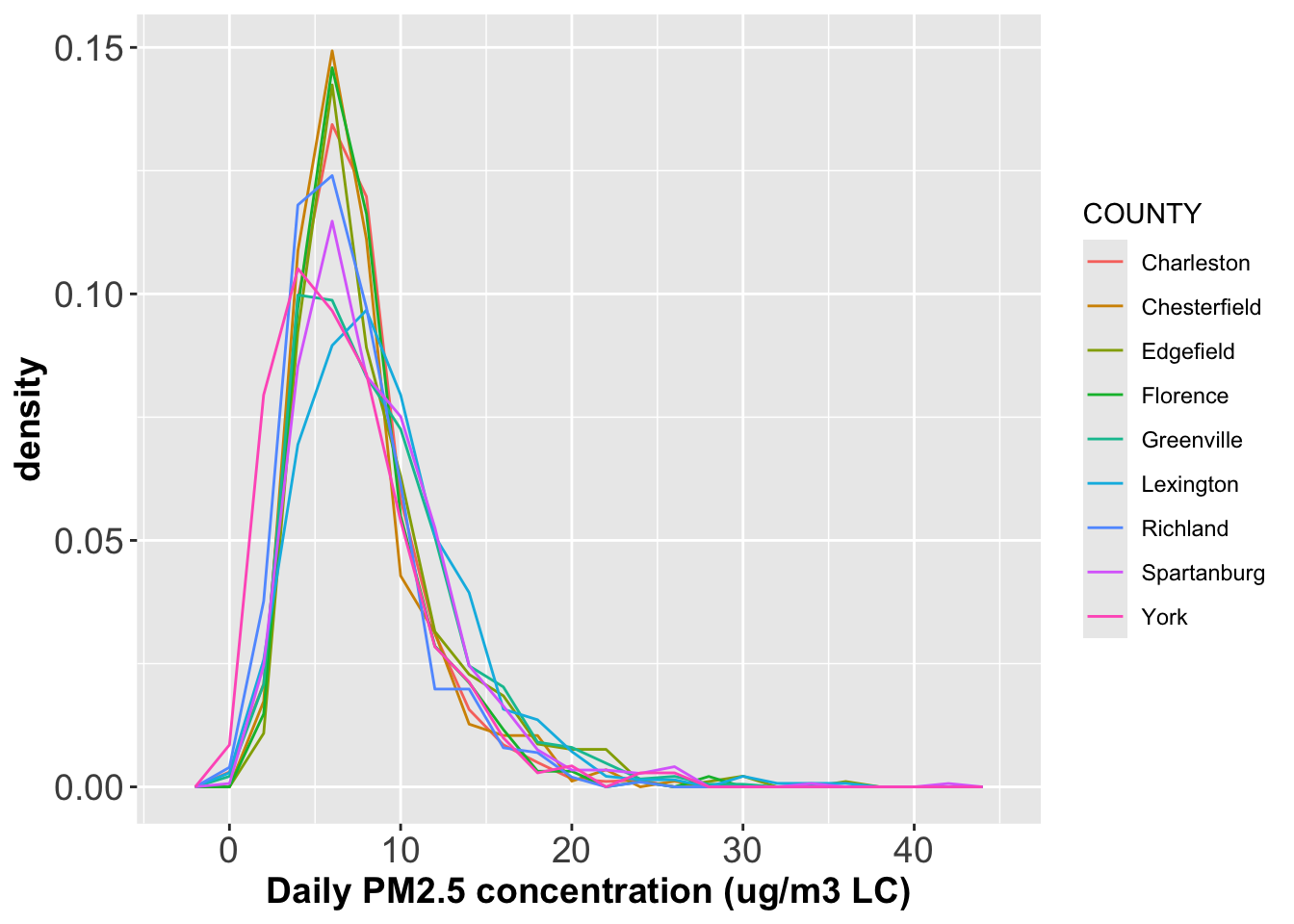
Generate density plots of PM2.5 concentrations grouped by County in one single panel, where each density should have its own color. What do you find from the figure?
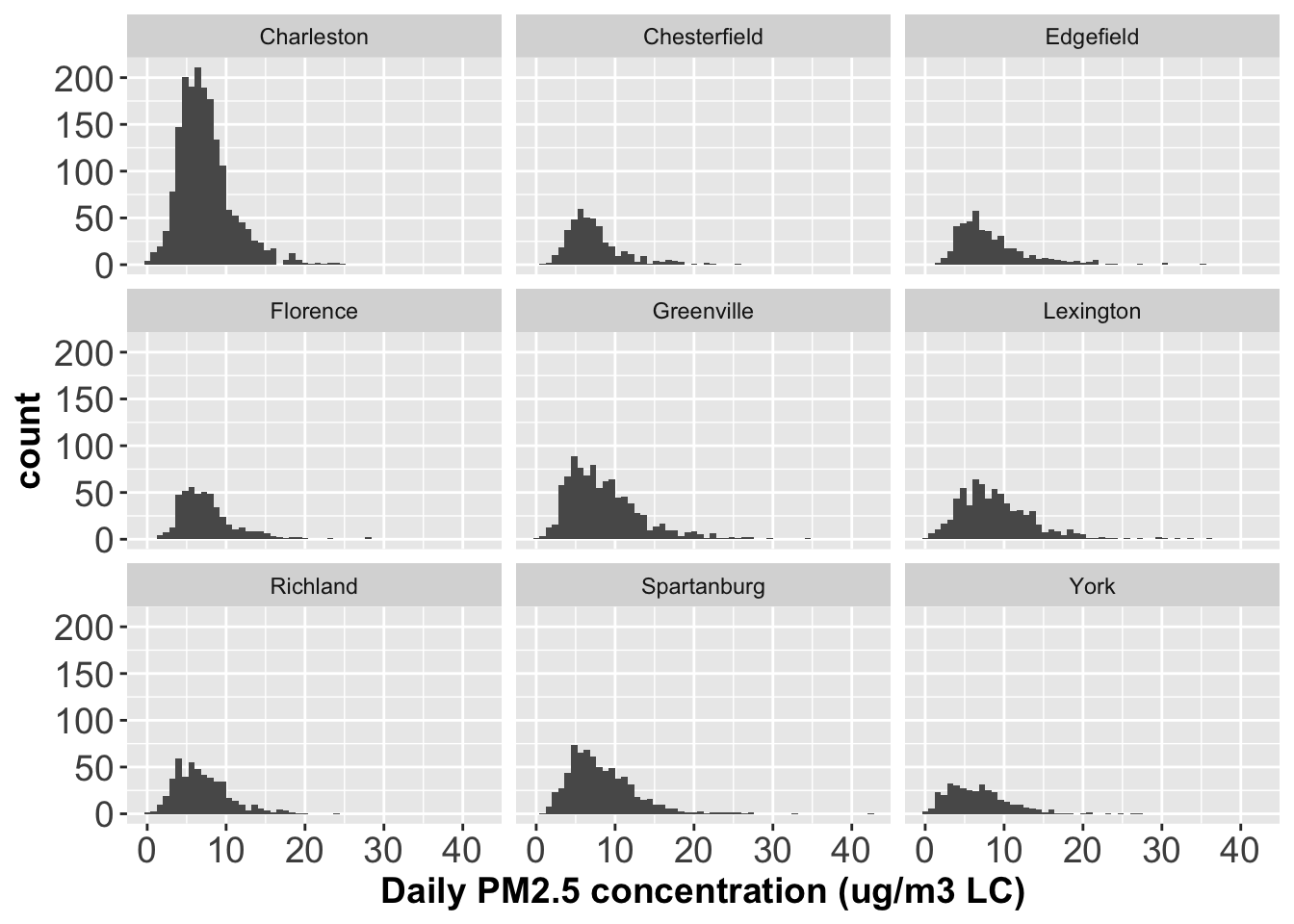
Plot histograms of PM2.5 concentrations across different counties with one panel for one histogram.
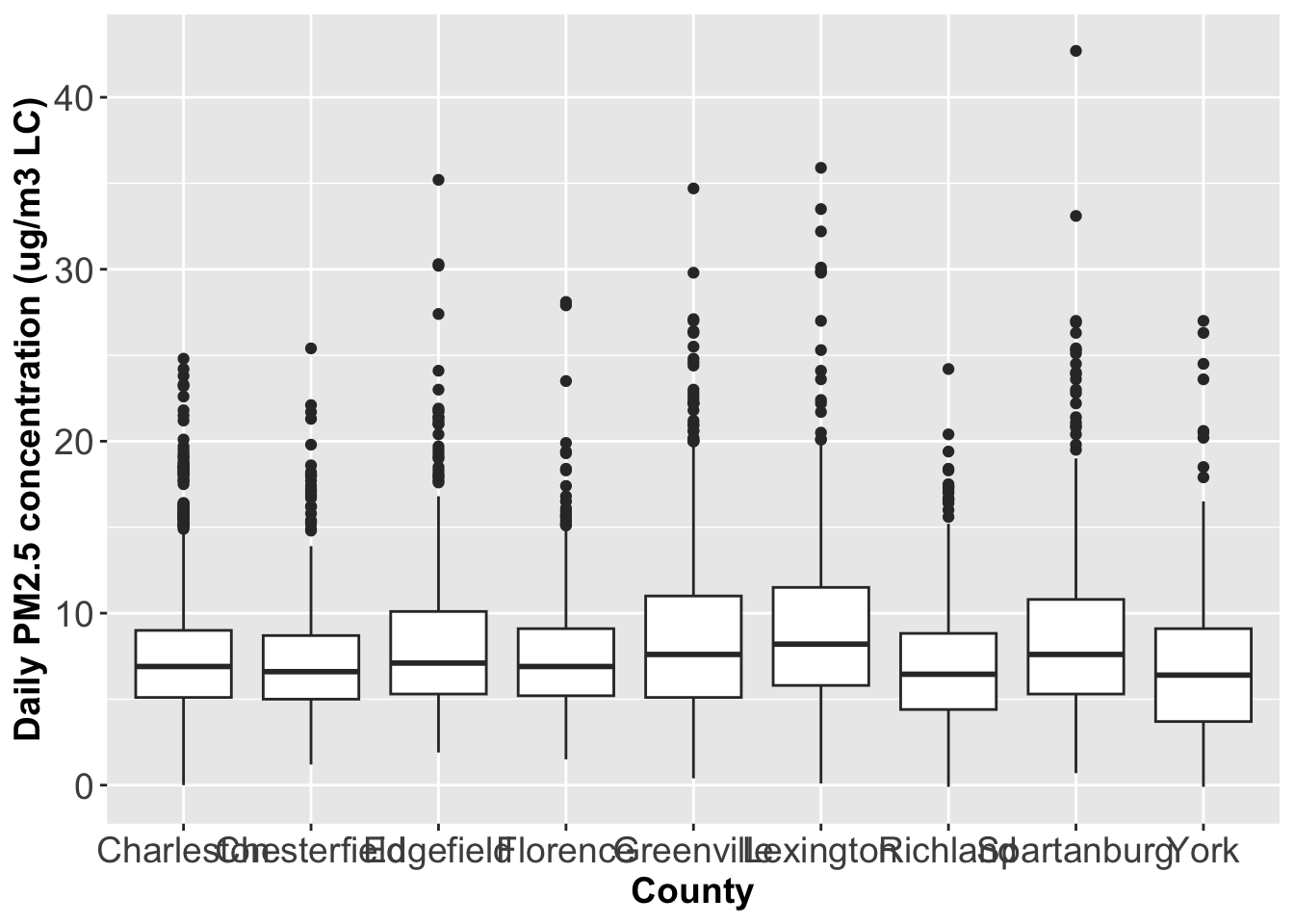
Generate boxplots of PM2.5 concentrations by County. What would you say about the distributions?
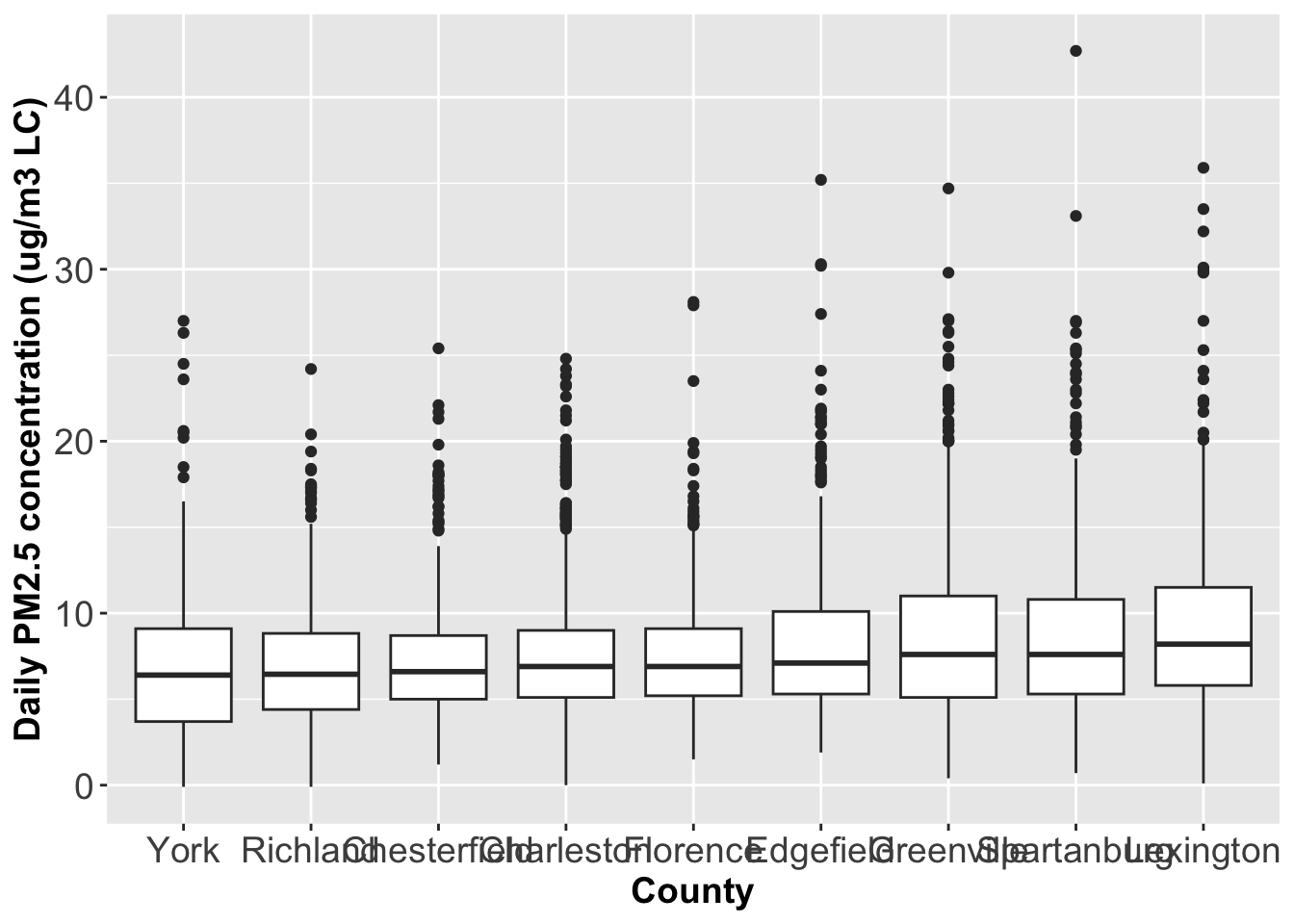
Reorder the boxplots above by the median value of PM2.5 concentrations.
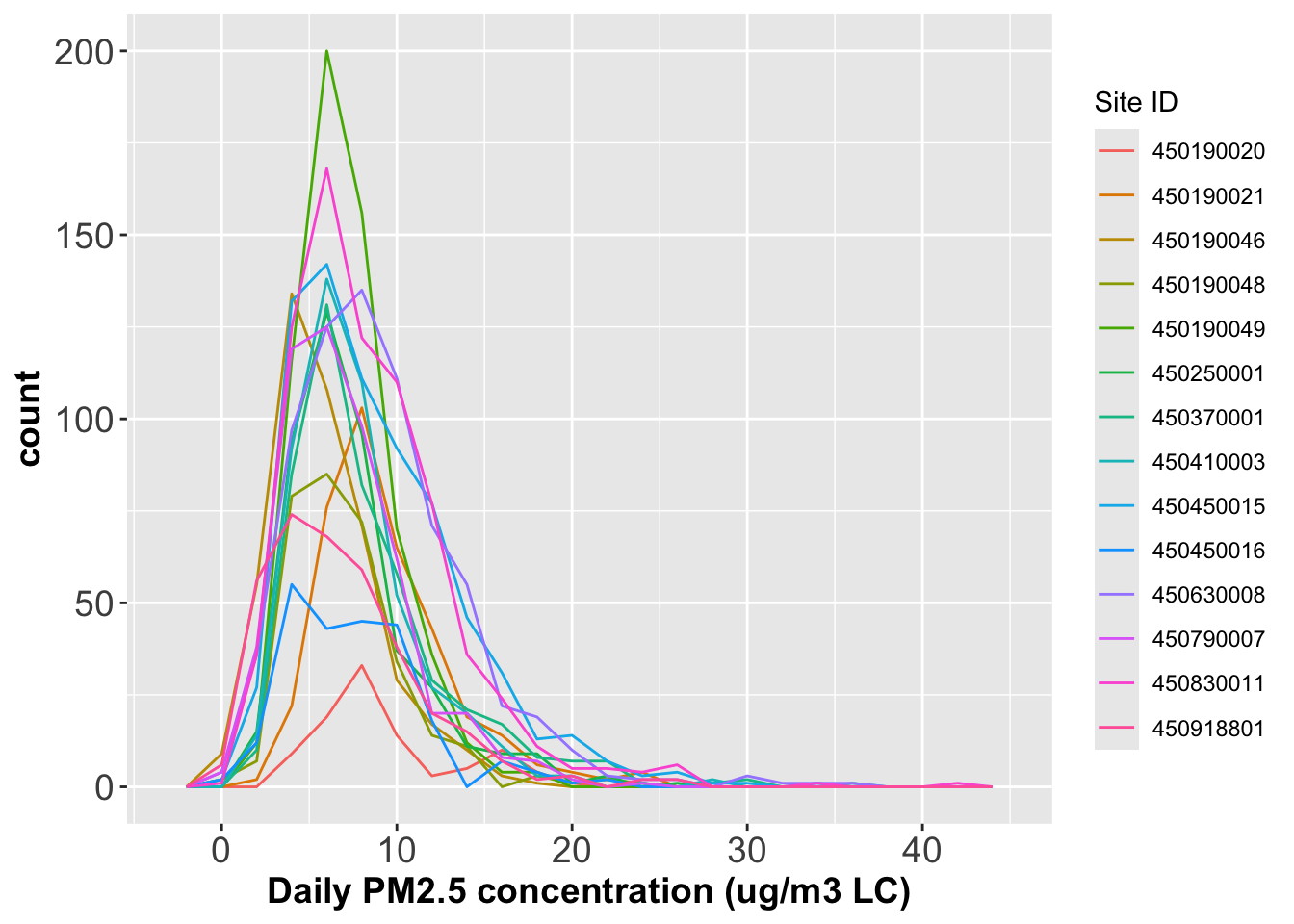
Converting the Site ID to a factor and plot the histogram grouped by Site ID.
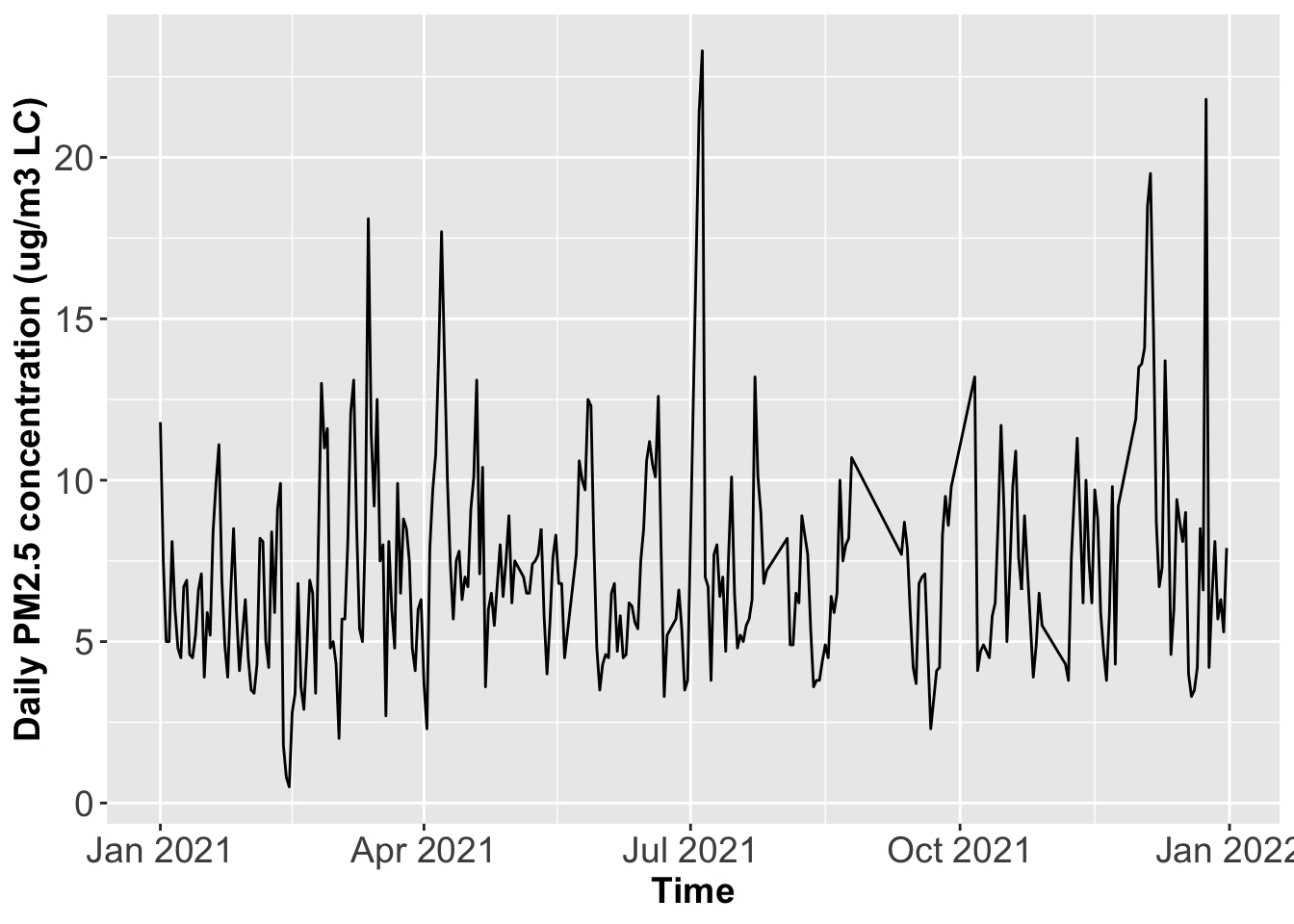
Generate the time series plot for the monitoring Site ID 450190048.
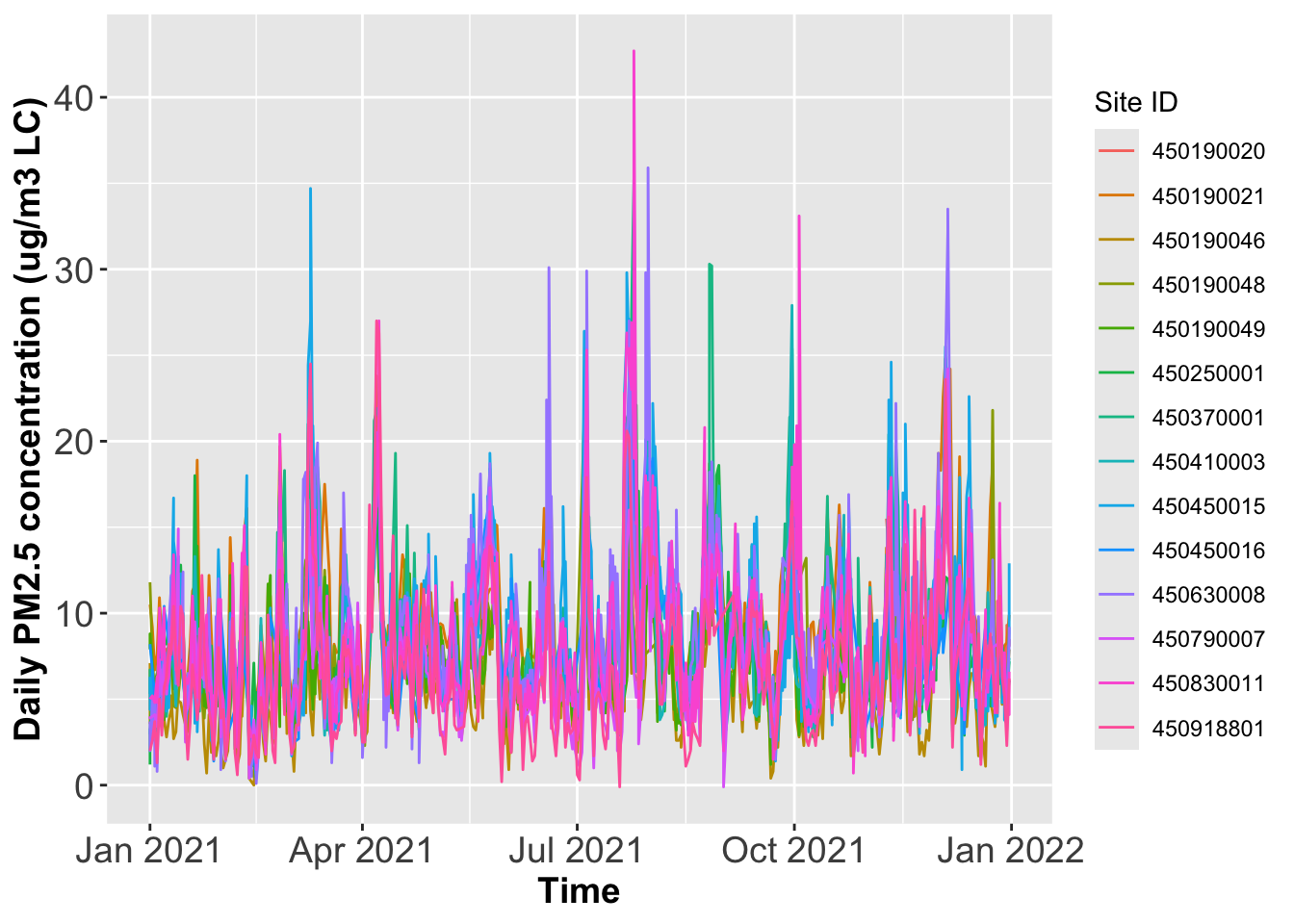
Plot time series of PM2.5 concentrations for all monitoring sites in one panel, where each site has its own color
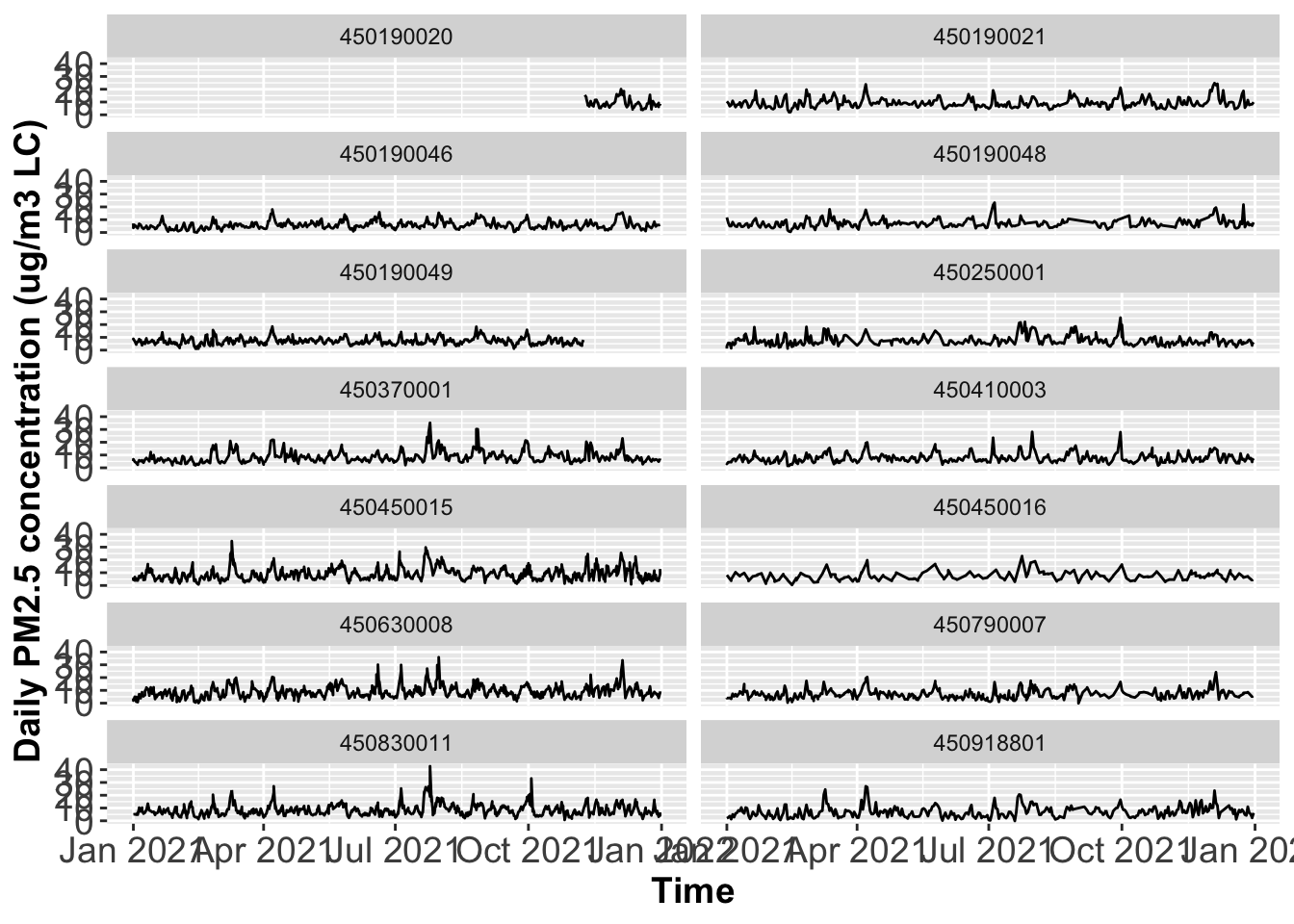
Plot time series of PM2.5 concentrations across all monitoring sites in multiple panels, where one panel only has one site, and each row only has two panels.
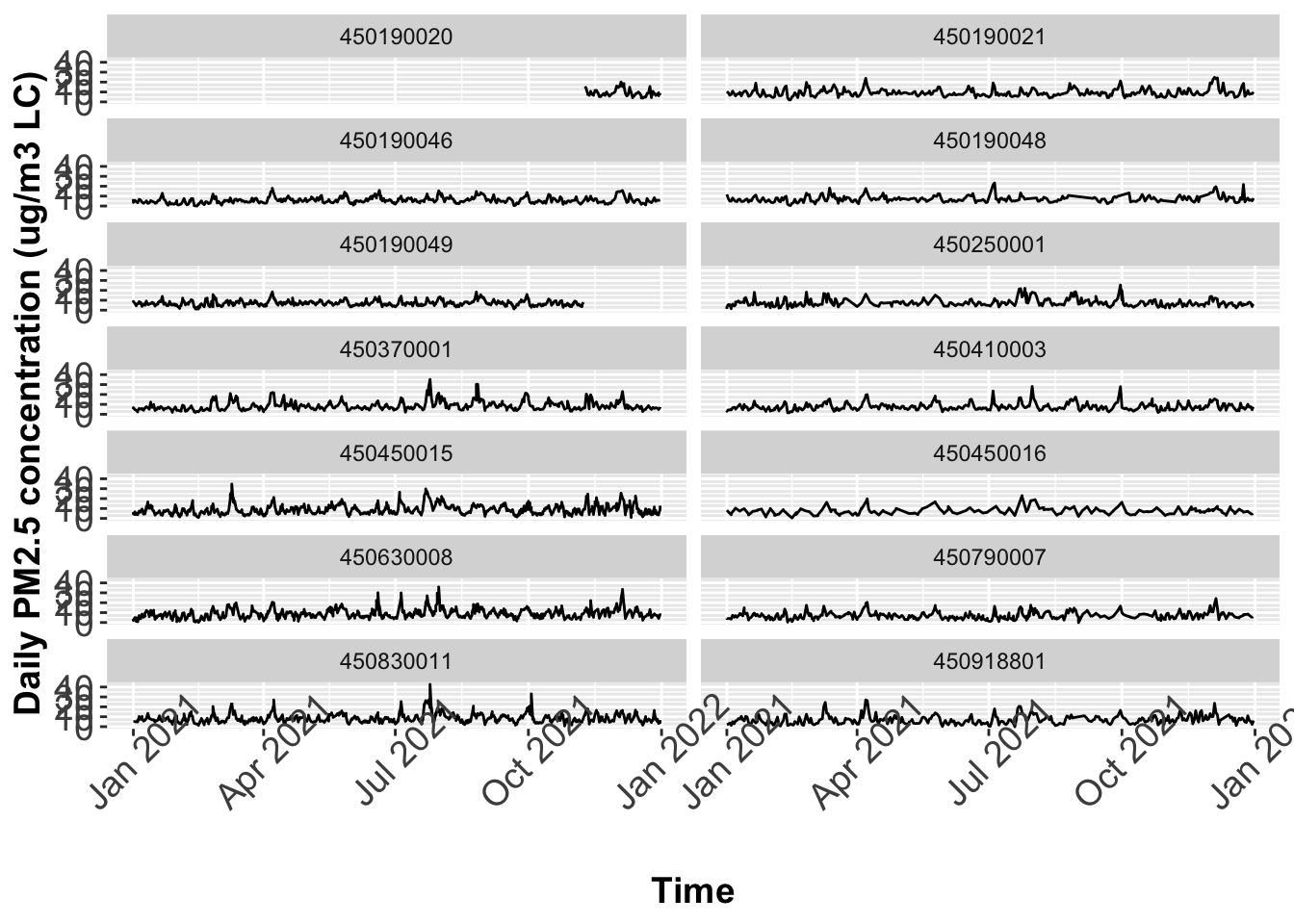
In the time series plot, there seems to be not enough space to hold the x-axis labels. One way to avoid this is to rotate the axis labels. Please rotate all the time labels 45 degree.